Repository navigation
Surface Shaper
📖 Canonical version: read this page on the official docs site — https://www.redamon.org/docs/surface-shaper. The GitHub wiki is a mirror.
The Surface Shaper lets you define a focused attack surface from the full reconnaissance graph using natural language. Instead of working with every discovered node, you describe the subset you care about and the AI generates a Cypher query that carves out exactly that slice.
Once a surface is active, it scopes:
- Graph Map -- only matching nodes and connections are rendered
- Data Table -- rows filtered to the surface
- Bottom Bar -- node type legend and stats reflect the surface
-
AI Agent -- the agent's
query_graphtool sees only nodes within the surface
- Click the filter + plus icon on the far left of the tab bar
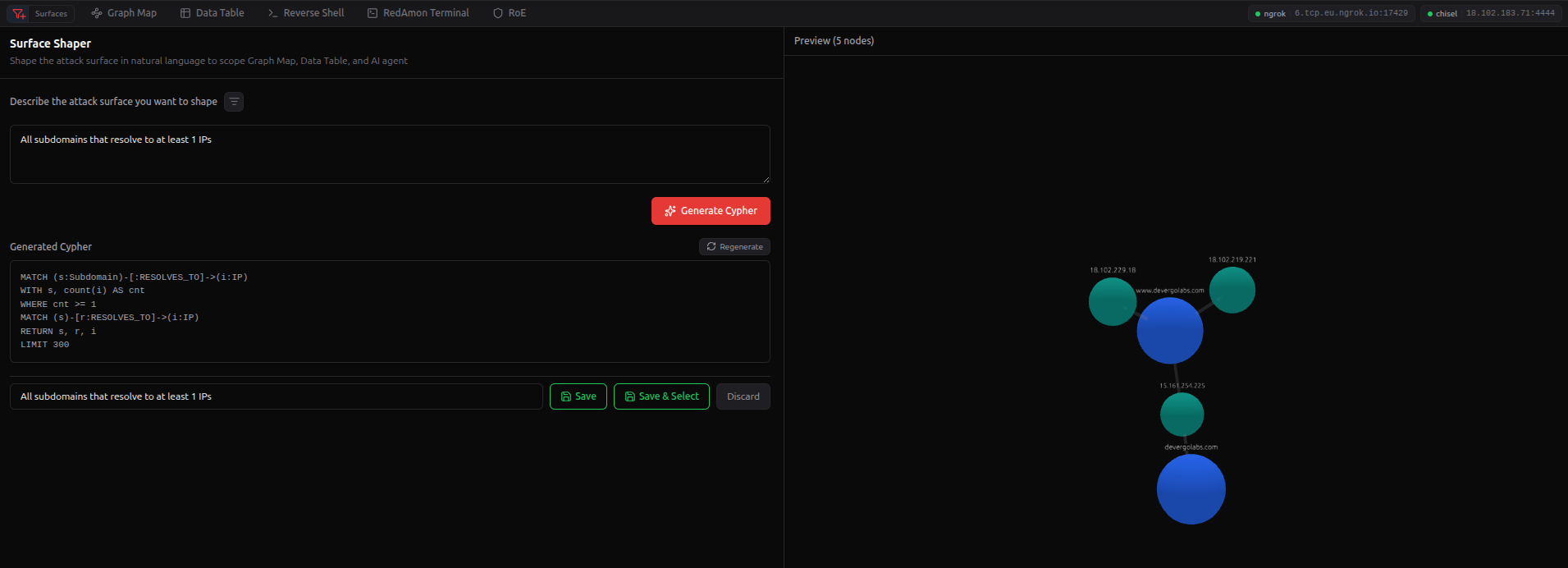
- Describe the attack surface you want in plain English
- Use the examples dropdown (filter icon next to the label) for inspiration -- 20 queries organized by category
- Click Generate Cypher -- the AI produces a read-only Cypher query
- Preview the result in the right panel
- Name the surface and click:
- Save -- saves and stays on the page
- Save & Select -- saves, activates the surface, and switches to Graph Map
Saved surfaces appear in the tab bar next to the create button, as a unified control:
- Click Surfaces to open the dropdown and pick a saved surface
- The active surface name appears as a pill -- click the X to clear it
- Delete surfaces from the dropdown with the trash icon

Under the hood, the Surface Shaper generates a read-only Cypher query (write operations like CREATE, MERGE, DELETE are blocked). The query is executed against Neo4j with automatic project isolation, and the results are formatted using the same pipeline as the main Graph Map -- same node colors, labels, sizes, and connections.
When the AI agent runs with an active surface, the surface's Cypher is injected into the agent's query prompt as scope guidance. This narrows what the agent discovers via query_graph, but does not restrict chain creation -- attack chains always link to the full project graph.
| Category | Example |
|---|---|
| Infrastructure | All subdomains that resolve to at least 4 IPs |
| Vulnerabilities | CVEs with CVSS score above 9 and the technologies they affect |
| Web Application | All endpoints with injectable parameters |
| Threat Intelligence | IPs or domains appearing in OTX threat pulses with named adversaries |
| Attack Chains | Chain findings with critical severity and the steps that produced them |