Repository navigation
Recon Pipeline Workflow
📖 Canonical version: read this page on the official docs site — https://www.redamon.org/docs/recon-pipeline-workflow. The GitHub wiki is a mirror.

The Workflow View is an interactive visual representation of the entire reconnaissance pipeline. Instead of navigating through individual settings tabs, you see every module, its data dependencies, and how information flows from target input through discovery, scanning, probing, enumeration, and vulnerability assessment -- all in a single horizontal diagram.
The Project Settings form offers two ways to configure the recon pipeline:
- Tab View (default in edit mode) -- the traditional tabbed interface with collapsible sections
- Workflow View (default in create mode) -- the interactive pipeline diagram
Toggle between them using the two small icons at the left edge of the Recon Pipeline tab group. The list icon switches to Tab View; the branch icon switches to Workflow View.
Tip: Both views share the same data. Changes made in the Workflow View are instantly reflected in the Tab View and vice versa -- no re-fetching, no data loss.
The workflow diagram has three horizontal bands:
| Band | Position | Contents |
|---|---|---|
| Upper data band | Top | Data nodes produced and consumed by tools (Domain, Subdomain, IP, Port, Service, BaseURL, Endpoint, CVE) |
| Tool band | Center | All recon modules arranged left-to-right in pipeline order |
| Lower data band | Bottom | Additional data nodes (DNSRecord, Technology, Certificate, Header, Parameter, Vulnerability, Secret, ExternalDomain, MitreData, Capec) |
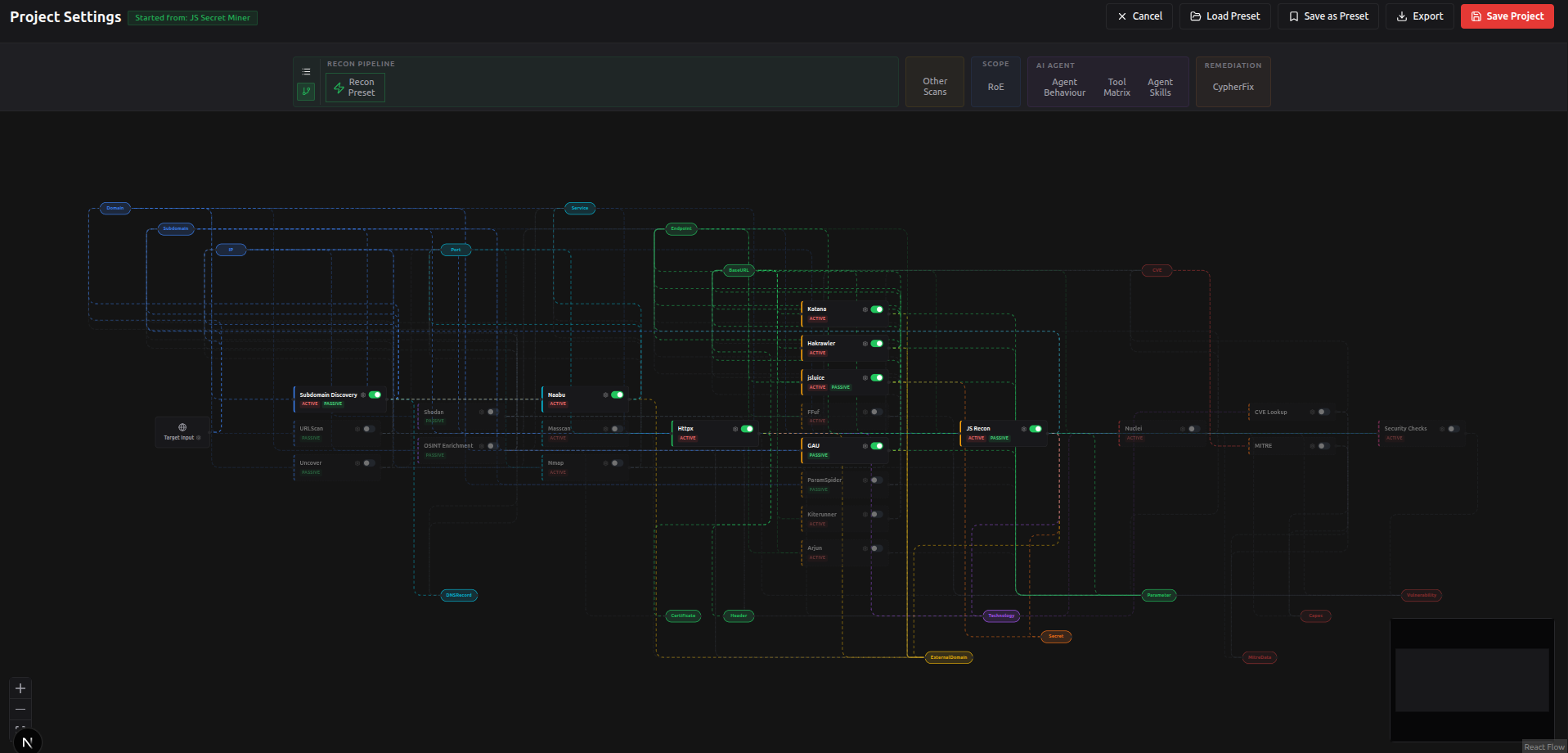
Each tool appears as a compact card showing:
- Tool name (e.g., "Naabu", "Httpx", "Katana")
- Active/Passive badge indicating the tool's scanning mode
- Enable/Disable toggle -- switch a module on or off directly from the graph
- Settings icon -- click to open the full configuration modal
- Left border color matching the pipeline stage (blue for Discovery, cyan for Port Scanning, green for HTTP Probing, etc.)
When a tool is disabled, its card becomes semi-transparent with a dashed border.
Data nodes are small colored pills representing the types of information that flow between tools:
| Category | Data Nodes | Color |
|---|---|---|
| Identity | Domain, Subdomain, IP | Blue |
| Network | DNSRecord, Port, Service | Cyan |
| Web | BaseURL, Endpoint, Parameter, Header, Certificate | Green |
| Technology | Technology | Purple |
| Security | Vulnerability, CVE, MitreData, Capec, Secret | Orange |
| External | ExternalDomain | Yellow |
Each data node shows which tools produce it, enrich it, and consume it. Hover over any data node to see a tooltip listing its producers, enrichers, and consumers.
There are two types of connections:
Dashed lines (produces/consumes) -- the tool creates new nodes of this type or reads them as input:
- Animated dashes -- data is actively flowing (the connected tool is enabled)
- Static dashes -- the connected tool is disabled or the data node has no active producer
Dotted lines (enriches) -- the tool updates existing nodes with additional properties (e.g. adding geo/ASN data to an IP, or domain age to a Domain) without creating new nodes:
- Animated dots -- enrichment is active (the tool is enabled)
- Static dots -- the tool is disabled
All edges are colored per node type, matching the graph page legend colors (e.g. Domain edges are deep navy, IP edges are teal, Port edges are dark cyan).
The tools are organized into pipeline stages from left to right:
| Stage | Tools | Description |
|---|---|---|
| Input | Target Input | The starting point -- your domain, subdomains, or IPs |
| Discovery & OSINT | Subdomain Discovery, URLScan, Shodan, OSINT Enrichment | One column, stacked: enumerate subdomains, resolve DNS and discover related assets, then gather passive intelligence (Shodan, and the OSINT Enrichment sources: Censys, FOFA, OTX, Netlas, VirusTotal, ZoomEye, CriminalIP). Uncover has no node of its own: its settings live inside OSINT Enrichment, and the scan runs it only while OSINT Enrichment is on |
| Port Scanning | Naabu, Masscan, Nmap, TLS Grab | Active port discovery and service version detection, then one TLS handshake on each open port that speaks TLS but not HTTP to capture its certificate (GROUP 3.6, before the HTTP probe, so names in the certificate become probe targets; see TLS Certificate Grab) |
| HTTP Probing | Httpx, IP Attribution | Probe discovered hosts for live HTTP/HTTPS services, detect technologies; then tag every IP shared edge, dedicated or unknown (see Running Reconnaissance) |
| Resource Enum | Katana, ZAP Ajax Spider, Hakrawler, jsluice, FFuf, GAU, ParamSpider, Kiterunner, Arjun, OpenAPI, Endpoint AI Classifier | Crawl, fuzz, and discover endpoints, parameters, and secrets; then the Endpoint AI Classifier tags each endpoint that looks like an AI interface (chat, completion, embeddings, RAG ingest) and its prompt-injectable parameters, with no traffic of its own (see Adversarial AI Recon) |
| JS Recon | JS Recon, Serialized Objects, AI Surface Recon, Supply Chain | Deep JavaScript analysis -- secrets, endpoints, frameworks, dependency confusion. Serialized Objects reads the headers, cookies, parameters and form fields the pipeline already holds and flags serialized-object signatures (Java, .NET, PHP, Python pickle, and more) as candidates for the agent to confirm, sending no request (Serialized Object Detection). AI Surface Recon sends benign, protocol-aware probes to the AI, LLM, MCP and vector-DB surfaces the earlier stages tagged (AI Surface Recon). Supply Chain (Supply-Chain Recon, GROUP 5.5, after JS Recon) is a black-box harvest of the npm packages the target serves (source maps + http_probe technologies + retire.js), verdicted offline against the local OSV database for known-malicious (MAL-) and known-vulnerable (CVE / GHSA) packages. Off by default. See Supply-Chain Scanning
|
| Vuln Scanning | Nuclei, GraphQL Scan, Subdomain Takeover, VHost & SNI, Cache Poisoning, Route Exposure | Template-based vulnerability scanning with 9,000+ checks (Nuclei) + GraphQL introspection/misconfig testing + layered subdomain takeover detection + hidden virtual host discovery via L7/L4 probes + active web cache poisoning/deception detection (WCVS breadth + native 5-phase confirmation) + routes open without authentication and exposed files (Route Exposure Scan). All run in parallel (GROUP 6 Phase A) |
| CVE & MITRE | CVE Lookup, MITRE | Technology-based CVE lookup and MITRE ATT&CK/CWE/CAPEC enrichment |
| Security | Security Checks, Origin Discovery | 26 security configuration checks (TLS, headers, DNS, auth, exposure) + the real origin server hiding behind a CDN or WAF, gathered from public catalogues and DNS history and confirmed reachable directly (Origin Discovery; off by default, runs with the GROUP 6 Phase A scanners) |
Cross-cutting layer — Adversarial AI signal extraction. Independently of the stages above, every Discovery, Port Scanning, HTTP Probing, Resource Enum, and JS Recon tool also runs a thin AI-aware hook that tags AI services (local LLM runtimes, vector DBs, AI frontends, proxies, SDK clients) on the same graph nodes it normally writes. The hooks live inside the existing modules, gated by per-feature toggles. Coverage so far: DNS provider hints (Phase 1), AI port catalog (Phase 2), Nmap runtime regex (Phase 3), HTTP header/title/favicon/Wappalyzer signatures (Phase 4), endpoint AI classifier with
ai_interface_type/is_ai_rag_ingest/prompt-injectable params (Phase 5), and JS Recon AI SDK detection writing five newJsReconFinding.finding_type ai-sdk-*values + Secret enrichment (Phase 6). All hooks produceai_*/is_ai_*properties plusTechnology(category=ai-*)nodes; zero new graph labels. See Adversarial AI Recon for the full breakdown.
The workflow view makes dependency issues immediately visible. When a tool is enabled but its required input data has no active producer, two things happen:
- The data node turns red with a pulsing animation (starved -- no tool is feeding it)
- The tool node shows an amber warning icon with a detailed tooltip explaining what's missing

| Scenario | Starved Data Node | Affected Tools |
|---|---|---|
| Httpx + GAU + ParamSpider all disabled | BaseURL | Katana, ZAP Ajax Spider, Hakrawler, jsluice, FFuf, Kiterunner, Arjun, Nuclei, JS Recon, Security Checks |
| All port scanners (Naabu, Masscan) + Shodan + OSINT Enrichment + Uncover all disabled | Port, Service | Nmap, Httpx |
| Nmap + Httpx all disabled | Technology | CVE Lookup |
| Shodan + OSINT Enrichment + Nmap + Nuclei all disabled | CVE | MITRE |
Note: BaseURL has three true sources: Httpx, GAU, and ParamSpider. Disabling only Httpx does NOT starve BaseURL if GAU or ParamSpider is still enabled. Similarly, Port has multiple true sources (Naabu, Masscan, Shodan, OSINT Enrichment, Uncover) -- all must be disabled for Port to be starved.
Important: The chain-breaking logic uses a "true source" algorithm. Tools that both consume AND produce the same data type (e.g., Katana consumes BaseURL and produces BaseURL) are treated as recyclers, not original sources. Only tools that create data from scratch count as true sources. Tools that only enrich a data type (e.g., Nmap enriches Port with version info) are not considered sources for chain-breaking purposes.
Clicking a tool node highlights it and all its directly connected data nodes and edges. Non-connected edges dim, making the tool's data dependencies easy to trace. Click the same node again or click empty canvas to clear the highlight.
Clicking a data node highlights it and all tools connected to it -- both producers and consumers. This is useful for understanding which tools contribute to a specific data type and which tools depend on it.
Click the settings icon (gear) on any tool node to open a modal with the full settings panel -- identical to what you see in Tab View. Changes are saved to the same form data and reflected immediately in the graph.
Click the Input node to open the Target & Modules configuration. While creating a project, the dialog opens with a link, Upload it in RoE, for when you have a Rules of Engagement document: it takes you to the RoE tab, and the limits the document sets fill this form for you to review. See Rules of Engagement.
Every tool's input, output, and enrichment data types are defined in the node mapping and verified against the actual recon pipeline Cypher queries. Produces means the tool creates new graph nodes. Enriches means the tool adds properties to existing nodes (e.g. geo data, domain age, version info) without creating them.
| Tool | Consumes | Produces | Enriches |
|---|---|---|---|
| Subdomain Discovery | Domain | Subdomain, IP, DNSRecord, ExternalDomain | Domain |
| URLScan | Domain | Subdomain, ExternalDomain, Endpoint, Parameter, Vulnerability (urlscan_leak), Secret (urlscan: keyed by an HMAC, value and full link kept for display) |
Domain, IP (HISTORICALLY_RESOLVED_TO), BaseURL |
| Uncover | Domain | IP, Subdomain, Port, Endpoint | -- |
| Tool | Consumes | Produces | Enriches |
|---|---|---|---|
| Shodan | IP | Port, Service, Subdomain, ExternalDomain, DNSRecord, Vulnerability, CVE | IP |
| OSINT Enrichment | IP, Domain | Subdomain, Port, Service, ExternalDomain, DNSRecord, Certificate, Vulnerability, CVE | IP, Domain |
The passive CVEs these produce (Shodan, InternetDB, Netlas, CriminalIP) are checked against the port scan's results and pruned at the end of a full scan when the provider no longer reports them, on the IPs it was asked about (or that were dropped before asking as CDN edges or private addresses). IPs a provider could not be asked about keep theirs, and so does an IP the scan no longer covers, until a scan asks about it again. A Port only Shodan reported carries passive_only: true until an active scan (the port scan, nmap, httpx or GVM) finds it. On a name with several addresses an httpx answer goes to the address whose port scan has that port open, not always the address httpx names. See Running Reconnaissance.
| Tool | Consumes | Produces | Enriches |
|---|---|---|---|
| Naabu | IP, Subdomain | Port, Service | IP, Domain |
| Masscan | IP | Port, Service | IP, Domain |
| Nmap | IP, Port | Technology, Vulnerability, CVE | Port, Service |
| TLS Grab | IP, Port | Certificate, Subdomain (names in the certificate that pass the scope check) | Service (the negotiated TLS version, cipher and posture) |
| Tool | Consumes | Produces | Enriches |
|---|---|---|---|
| Httpx | Subdomain, IP, Port | BaseURL, Certificate, Technology, Header | Subdomain, Domain |
| IP Attribution | IP, Port, Subdomain | -- | IP |
IP Attribution creates no node: it writes each existing IP's ownership tag (shared edge, dedicated or unknown), the reasons for it, the names of the certificate the IP presents without SNI, and how many DNS names point at it. Its partial run re-tags the IPs already in the graph; it takes no custom input.
| Tool | Consumes | Produces | Enriches |
|---|---|---|---|
| Katana | BaseURL | Endpoint, Parameter, BaseURL, ExternalDomain | -- |
| ZAP Ajax Spider | BaseURL, Endpoint | Endpoint, Parameter, BaseURL, ExternalDomain | -- |
| Hakrawler | BaseURL | Endpoint, Parameter, BaseURL, ExternalDomain | -- |
| jsluice | BaseURL, Endpoint | Endpoint, Parameter, BaseURL, Secret, ExternalDomain | -- |
| FFuf | BaseURL, Endpoint | Endpoint, BaseURL, ExternalDomain | -- |
| GAU | Domain, Subdomain | Endpoint, Parameter, BaseURL, ExternalDomain, Vulnerability and Secret (url_archive: the leaked links and secrets of the URLs the quarantine holds) |
-- |
| ParamSpider | Domain, Subdomain | Endpoint, Parameter, BaseURL, ExternalDomain, Vulnerability and Secret (url_archive) |
-- |
| Kiterunner | BaseURL | Endpoint, BaseURL | -- |
| OpenAPI | BaseURL | Endpoint, BaseURL, Parameter | -- |
| Arjun | BaseURL, Endpoint | Parameter | -- |
| Endpoint AI Classifier | Endpoint, Parameter, BaseURL | -- | Endpoint (ai_interface_type, is_ai_rag_ingest), Parameter (is_ai_prompt_injectable) |
| Tool | Consumes | Produces | Enriches |
|---|---|---|---|
| JS Recon | BaseURL, Endpoint | Secret, Endpoint, JsReconFinding (incl. Phase 6 ai-sdk-* finding types: ai-sdk-client, ai-sdk-key-literal, ai-sdk-browser-allowed, ai-frontend-detected, ai-provider-url) |
Secret (Phase 6 mixin sets ai_provider + ai_finding_id on Secret nodes whose matched_text matches an AI key prefix and overlaps a Phase 6 captured value) |
| Serialized Objects | BaseURL, Endpoint (headers, cookies, parameters and form fields already in the graph) | Vulnerability (info, one candidate per sink and format, needs_agent_confirmation) | -- |
Serialized Objects is passive: it reads what earlier stages stored and sends no request to the target. The agent's deserialization skill confirms each candidate. See Serialized Object Detection.
Runs as GROUP 5.5 (after JS Recon, before Vulnerability scanning) in both domain and IP mode, gated on supplyChainReconEnabled (off by default). It consumes only data JS Recon already downloaded, so it sends no new request to the target; only the opt-in GuardDog deep analysis downloads packages, from the public registries. See Supply-Chain Scanning.
Three further passes run inside the same stage, so they inherit partial-recon
parity automatically: incident enrichment (attaches the catalog write-up to
findings that already exist), malicious-host correlation (compares the
target's own base URLs and the hosts its JavaScript came from against the
catalog's attacker domains, writing ThreatPulse + CONTACTS_MALICIOUS_HOST),
and typosquat detection. All three are local lookups against the offline
incident catalog and add no network traffic.
| Tool | Consumes | Produces | Enriches |
|---|---|---|---|
| Supply-Chain Recon | source maps + http_probe technologies + downloaded JS (from JS Recon) + the offline incident catalog |
Package, MalPackageFinding, Vulnerability (source='osv'), ThreatPulse (sca- prefixed) |
BaseURL (adds DEPENDS_ON -> Package for each served base URL, and CONTACTS_MALICIOUS_HOST -> ThreatPulse when a contacted host is in the catalog; never mutates the BaseURL node) |
Runs as Phase 4.5 (after Resource Enumeration / JS Recon, before Vulnerability scanning). Sends benign, protocol-aware probes to confirm and characterize AI/LLM/MCP/vector-DB surfaces. Deterministic — it makes no LLM calls (distinct from the AI in Pipeline decision hooks).
| Tool | Consumes | Produces | Enriches |
|---|---|---|---|
| AI Surface Recon | BaseURL, Endpoint (ai_interface_type), IP/Port (ai-vector-db), http_probe AI flags |
Vulnerability (MCP tool-poisoning, source=ai_surface_recon), Parameter (MCP tool args), Technology (ai-* confirmed via Julius + vector-DB reads) |
Endpoint (ai_supports_tools/vision/streaming, ai_model_family_guess, ai_model_ids, ai_latency_p50_ms, ai_mcp_*, ai_tool_schema_ref); Port (HAS_TECHNOLOGY → ai-vector-db) |
| Tool | Consumes | Produces | Enriches |
|---|---|---|---|
| Nuclei | BaseURL, Endpoint, Technology, Domain | Vulnerability, Endpoint, Parameter, CVE, MitreData, Capec | -- |
| GraphQL Scan | BaseURL, Endpoint, Domain | Vulnerability, CVE | Endpoint (GraphQL capability flags: graphql_graphiql_exposed, graphql_tracing_enabled, graphql_get_allowed, graphql_field_suggestions_enabled, graphql_batching_enabled, graphql_cop_scanned_at (when graphql-cop last ran on it), schema hash, operation counts) |
| Subdomain Takeover | Subdomain, BaseURL, Domain | Vulnerability (source=takeover_scan: dangling DNS records whose third-party target can still be claimed) |
-- |
| VHost & SNI | Subdomain, IP, Port, BaseURL, Certificate, DNSRecord, ExternalDomain | Vulnerability, BaseURL, Subdomain (hidden virtual hosts found by L7 Host and L4 SNI probes) | Subdomain, IP |
| Web Cache Poisoning | BaseURL, Endpoint, Technology | Vulnerability (source=cache_poisoning, with confidence_tier, cache_header/cache_param, cache_impact, cache_buster, poc_link, curl_verify) |
Endpoint, BaseURL |
| Route Exposure | BaseURL, Endpoint, Technology | Vulnerability (source=route_exposure: leads with needs_agent_confirmation, signature findings with their severity), Endpoint (generated routes that answered with content) |
Endpoint (anon_status) |
| CVE Lookup | Technology | CVE, MitreData, Capec | -- |
| MITRE | CVE | MitreData, Capec | -- |
| Security Checks | BaseURL, IP, Subdomain, Domain | Vulnerability | IP |
| Origin Discovery | Subdomain, IP | IP (confirmed origin servers), Vulnerability (origin reachable without the CDN or WAF) | IP |
The CVE Lookup writes its Technology → CVE → MitreData → Capec chain in domain and IP mode alike. In a domain scan it runs inside the parallel vulnerability fan-out, which hands its results back together with Nuclei's.
Partial Recon lets you run any single tool from the pipeline independently, without re-running the entire scan. Every tool node in the Workflow View has a dedicated Run partial recon button (the play icon on each section header). Clicking it opens a modal where you configure exactly what to scan, review the graph data the tool will operate on, and launch the tool in isolation.

Results are merged back into the existing graph using Neo4j MERGE operations -- duplicates are updated, not recreated. This makes partial recon fully incremental: you can run the same tool multiple times and the graph stays clean.
Important: Partial recon uses the settings saved on the project. Every parameter you configured in the project form (timeouts, wordlists, thread counts, API keys, etc.) applies to the partial run. The tool's enabled flag is force-set to
trueregardless of whether you disabled it in the project settings -- everything else uses your saved configuration.
- You click the play icon on a tool section header (or the tool node in Workflow View)
- The modal fetches graph inputs -- it queries Neo4j for existing data relevant to that tool (how many subdomains, IPs, ports, BaseURLs, or endpoints are already in the graph)
- You optionally add custom targets (subdomains, IPs, ports, or URLs depending on the tool)
- You choose whether to include graph targets alongside your custom inputs
- Clicking Run sends the request to the orchestrator, which spawns a lightweight recon container running only that tool
- The container loads project settings from the webapp API, merges your custom inputs with graph data, runs the tool, and writes results back to Neo4j
A project in Domain batch mode has several scan roots (one per scope group: a wildcard's own name, or the registrable domain of a group of listed hosts). Partial recon covers every scan root in one run:
- The modal lists the scan roots it will scan. Past three, the list collapses to a count.
- Graph counts cover every current scan root. The graph has one domain node per registrable domain, and the counts keep only hosts a current group admits (the longest scan root a host sits under decides). Hosts of a scan root you removed from the batch are not counted or scanned; the next full recon removes them. A scan root with no recon data yet is marked no recon data yet.
- Custom inputs must be in scope. A typed subdomain or URL host is accepted only if a group admits it: strictly under an enumerated scan root, or one of a listed group's hosts, and a scan root itself only with Root on. IPs and CIDRs are limited to /24 (IPv4) and /120 (IPv6). A typed host, URL host, IP or attach target the Rules of Engagement exclude is dropped too, and a typed CIDR holding an excluded address is scanned as its other hosts. While the Rules of Engagement hold an IP or CIDR entry, a typed name (a host, a URL's host, or the name typed IPs attach to) is resolved and dropped when any address it resolves to is excluded, and the container also drops one with no address. The modal checks scope, and the orchestrator and the recon container check scope and the exclusions again; anything refused is dropped with a log line, and a run whose typed targets were all refused (and that reads no graph targets) is refused.
- Each group keeps its scope. A wildcard group is scanned in full under its scan root. A listed group is scanned exactly as uploaded: only its listed hostnames, and its scan root only if you listed it (or ticked Root). A single-domain project with a subdomain prefix list is a listed group too.
- Subdomain Discovery enumerates wildcard scan roots only. The modal shows a checklist of the scan roots allowed to enumerate. A listed group is skipped, because it is scanned exactly as uploaded.
- URLScan, Uncover, Shodan, OSINT Enrichment and Subdomain Discovery run once per scan root, one after another. If one fails or is rate-limited, the others still run, and a rate-limited one is retried once.
- An older graph is refused. A graph built before the current scope model (a domain node named after an old scan root that still holds data) makes partial recon refuse with run a full recon first, and the modal shows the same banner with Run disabled.
The orchestrator derives the scan roots from the saved project, never from the request, and the container checks each one again before scanning. A scan root is refused if the Rules of Engagement exclude it or, when ownership verification is on, if neither <prefix>.<scan root> nor <prefix>.<registrable domain> holds the token (a resolver failure refuses it too, with the resolver's error). The run's log ends with a report: the scan roots scanned, then every other one with its reason (refused-roe, refused-ownership, no_results, rate_limited, failed, or not scanned). The run is marked as failed only when no scan root ran.
A full recon makes the same Rules of Engagement and ownership checks before it clears the previous recon data. When every scan root is refused, the run ends failed and the graph is left exactly as it was (Nothing was cleared in the log); when at least one passes, the graph is cleared once and the refused roots are skipped in the run.
Deleting a project also stops its running partial recons.
Stealth mode refuses the tools it switches off. On a stealth project, a partial run of a tool stealth mode turns off (Masscan, Hakrawler, ZAP Ajax Spider, FFuf, Kiterunner, OpenAPI, Route Exposure, VHost & SNI, Web Cache Poisoning) is refused before it reads the graph or starts a container: the log says Refusing to run: <tool> is off in stealth mode, and the run ends with an error. A tool stealth mode only throttles runs on the stealth values, as in a full scan.
Every tool's modal shares the same layout but exposes different input sections depending on what the tool consumes.
At the top of every modal you see two panels connected by an arrow:
- Input (blue) -- lists the node types the tool consumes (e.g., IP, Subdomain, Port) and the current counts from the graph (e.g., "example.com (12 IPs, 34 subdomains)")
- Output (green) -- lists the node types the tool produces (e.g., Port, Service) and the types it enriches (shown with a dashed border)
Below that, a description explains what the tool does and how targets are loaded.
The "Include existing graph targets" checkbox (enabled by default) controls whether the tool operates on data already in the graph. When unchecked, the tool only scans your custom inputs. This is useful when you want to scan a specific IP or URL without re-scanning everything.
Unchecked, partial Nuclei and the partial Security Checks add no project root: the root is a target only if you typed it. The Security Checks check a typed IP that is not attached to a subdomain as its own host.
While the Rules of Engagement hold an IP or CIDR entry, these two tools resolve a typed URL's host once when the graph gives them no address for it (with the box unchecked, every typed host), and refuse the host if any address it resolves to is excluded or if it does not resolve.
Different tools expose different input fields. Each field accepts one value per line and validates in real time:
| Input Type | Available For | Validation Rules |
|---|---|---|
| Custom Subdomains | Naabu, Httpx, GAU, ParamSpider, Security Checks, Subdomain Takeover, VHost & SNI, Origin Discovery | Must be a valid hostname under one of the project's root domains |
| Custom IPs | Naabu, Masscan, Nmap, TLS Grab, Httpx, Shodan, OSINT Enrichment, Security Checks, VHost & SNI | IPv4, IPv6, or CIDR notation. CIDR restricted to /24-/32 (v4) or /120-/128 (v6) |
| Custom Ports | Nmap, TLS Grab, Httpx | Integer 1-65535 |
| Custom URLs | Katana, OpenAPI, ZAP Ajax Spider, Hakrawler, jsluice, FFuf, Kiterunner, Arjun, Nuclei, JS Recon, Serialized Objects, Supply-Chain Recon, Security Checks, GraphQL Scan, Web Cache Poisoning, Route Exposure | Must use http/https and the hostname must be in the project scope |
| JS File Upload | JS Recon only | Upload .js files for offline analysis |
When adding custom IPs, you can optionally select an "Attach IPs to subdomain" dropdown. This tells the system which existing subdomain the IPs belong to, so they are linked correctly in the graph (as HAS_IP relationships) instead of being created as standalone UserInput nodes.
Similarly, when adding custom URLs for resource enumeration tools, you can select an "Attach URLs to BaseURL" dropdown to link discovered endpoints to a specific parent BaseURL.
In a domain project, TLS Grab handshakes each typed IP at that IP. tlsx resolves any name it is given and connects wherever the name points, so the attach name is sent for a typed IP only when that IP is the one address the name resolves to. Every other typed IP is handshaken by address, without a name; when no typed IP gets the name, the log says Typed IPs are handshaken by address, without SNI: ....
In a domain project, Security Checks probe a graph host only on a web port the graph shows live (an open Port node or a BaseURL), as a full run does with its own port scan and httpx data; a graph host with nothing live is not probed. A subdomain or IP you type that the graph has no live row for is probed on both :80 and :443, and one the graph has a row for follows that row. When the graph holds no open port and no BaseURL at all, every host is probed on both ports. The Rules of Engagement still apply: a typed address they exclude, or a typed name with any excluded address, is not probed.
The Nuclei modal includes three additional toggles that override project settings for the partial run:
- CVE Lookup -- cross-reference discovered technologies with NVD/Vulners for known CVEs
- MITRE ATT&CK -- enrich vulnerabilities with MITRE ATT&CK techniques, CWE, and CAPEC mappings
- Security Checks -- run the 26 built-in security configuration checks alongside Nuclei templates
For tools that benefit from API keys (Shodan, URLScan, Uncover, OSINT Enrichment, Nuclei), the modal checks your user settings and shows a warning for each missing key with an explanation of the impact. For example, running Shodan without a key falls back to InternetDB (free) which provides less data.
The supported tools fall into distinct categories based on what inputs they need:
| Category | Tools | Primary Graph Inputs | Custom Inputs Accepted |
|---|---|---|---|
| Discovery | Subdomain Discovery, URLScan, Uncover | Domain | -- |
| Port Scanning | Naabu, Masscan | IPs, Subdomains | Subdomains, IPs |
| Service Detection | Nmap | IPs, Ports, Subdomains | Subdomains, IPs, Ports |
| TLS Certificates | TLS Grab | IPs, Ports | IPs, Ports |
| HTTP Probing | Httpx | Subdomains, IPs, Ports | Subdomains, IPs, Ports |
| IP Attribution | IP Attribution | IPs, Ports, Subdomains | -- (re-tags the IPs already in the graph) |
| Crawling / Fuzzing | Katana, OpenAPI, ZAP Ajax Spider, Hakrawler, jsluice, FFuf, Kiterunner | BaseURLs | URLs |
| Passive URL Discovery | GAU, ParamSpider | Domain, Subdomains | Subdomains |
| Parameter Testing | Arjun | BaseURLs, Endpoints | URLs |
| Endpoint AI Classifier | Endpoint AI Classifier | Endpoints, Parameters, BaseURLs | -- |
| JS Analysis | JS Recon | BaseURLs, Endpoints | URLs, JS file uploads |
| Serialized Objects | Serialized Objects | BaseURLs, Endpoints | URLs |
| AI Surface Recon | AI Surface Recon | BaseURLs, Endpoints tagged as AI interfaces, vector-DB Services | -- |
| Supply Chain | Supply-Chain Recon | BaseURLs, Endpoints, Technologies | URLs |
| Vuln Scanning | Nuclei | BaseURLs, Endpoints | URLs |
| GraphQL Security | GraphQL Scan | BaseURLs, Endpoints, JS Recon findings | URLs (validated against project scope; injected via GRAPHQL_ENDPOINTS) |
| Subdomain Takeover | Subdomain Takeover | Subdomains, BaseURLs, Domain (a root only when its scope group includes the root) | Subdomains |
| VHost & SNI | VHost & SNI | Subdomains, IPs, Ports, BaseURLs, Certificates, DNS records, external domains | Subdomains, IPs |
| Web Cache Poisoning | Web Cache Poisoning | BaseURLs, Endpoints | URLs (validated against project scope; injected as extra targets) |
| Route Exposure | Route Exposure | BaseURLs, Endpoints, Technologies | URLs (validated against project scope; each requested with its generated neighbours) |
| Security Checks | Security Checks | IPs, Subdomains, BaseURLs | Subdomains, IPs, URLs |
| Origin Discovery | Origin Discovery | Subdomains, IPs | Subdomains |
| OSINT | Shodan, OSINT Enrichment | IPs | IPs |

Naabu accepts custom subdomains and custom IPs in addition to graph targets. The input panel shows how many IPs and subdomains are already in the graph. Custom subdomains are resolved to IPs and added to the scan. Custom IPs can optionally be attached to an existing subdomain via the dropdown, so the graph relationship is preserved.

Katana accepts custom URLs that must be within the project scope. The input panel shows how many BaseURLs are already in the graph. Custom URLs are validated against the project domain -- out-of-scope URLs are rejected with a clear error. The "Attach URLs to BaseURL" dropdown lets you link discovered endpoints to a specific parent URL.

Nuclei shows the richest modal. Beyond custom URLs, it exposes three settings overrides (CVE Lookup, MITRE ATT&CK, Security Checks) that let you toggle sub-features without changing the project settings. It also shows API key warnings when NVD or Vulners keys are missing, explaining the impact on CVE enrichment.
Partial recon never duplicates data. Every graph update uses MERGE statements:
- If a node already exists (matched by its unique key -- e.g., subdomain name, IP address, port number on an IP), it is updated with new properties
- If the node does not exist, it is created
- Relationships are similarly merged -- running the same tool twice produces the same graph, not a doubled graph
When you provide custom inputs, the system creates a UserInput node in the graph linked to the results via PRODUCED relationships. This lets you trace which findings came from manual input vs. automated discovery. The node reads running while its run works, then completed (with completed_at) when the run ends normally, or error when the tool recorded a failure; a run that crashed or was stopped leaves it running. Orphan UserInput nodes (with no produced results) are cleaned up at the end of a run, but only the run's own ones and those of runs that have already ended: a node another partial run of the project is still filling is left alone.
Partial recon never removes findings: only a full scan prunes what it stopped reporting. A partial Shodan run marks a CVE's port as confirmed when the graph already holds that port as found by a port scan, and otherwise leaves the CVE's earlier verdict as it was.
Partial Shodan and OSINT Enrichment skip every IP an earlier run flagged as a CDN edge in the graph (is_cdn), as the full pipeline does, not only the addresses in the published CDN ranges: an edge's data describes the provider and its other tenants, not the target.
If the graph has no data for a tool's required inputs and you have not provided custom targets, the modal shows a contextual warning. For example:
- Naabu with 0 IPs: "Run Subdomain Discovery first to populate IPs, or add custom IPs/subdomains below"
- Katana with 0 BaseURLs: "Run Httpx first to discover BaseURLs, or add custom URLs below"
- Nmap with 0 Ports: "Run Naabu first to discover ports, or add custom IPs and ports below"
The Run button is disabled when there are validation errors or when no targets are available (graph empty + no custom inputs + graph targets unchecked).
For a focused deep-dive on each helper, the never-raise / key-boundary / cache contracts, and how this differs from Adversarial AI Recon, see AI in the Recon Pipeline.
Most security tools ship with static lists -- FFuf has its built-in extensions list, Nuclei has its cve,xss,sqli,... default tags, security checks have their hard-coded WAF header tokens. These lists were curated at one point in time, but the targets aren't static. CVE-2026 templates land monthly. WAF vendors rebrand their Server headers and rotate cookie names. A new tech stack pops up that nobody added rules for. The lists drift, and recon ends up firing thousands of irrelevant probes (every WordPress tag against a Node app, every PHP extension against ASP.NET) while silently missing what it can't recognise (a Cloudflare Workers WAF that strips cf-ray).
AI in Pipeline is RedAmon's answer to this drift. At specific decision points inside the recon pipeline, the relevant tool's planner pauses, asks the LLM "given the actual response/fingerprint we just observed, what should I run?", and feeds the answer back into the tool's command before execution. The pipeline still runs deterministically end-to-end -- this is decision augmentation, not agent autonomy. The LLM doesn't choose targets, doesn't write its own scans, doesn't sequence tools. It only narrows or sharpens decisions that the tool was about to make anyway.
This is a different layer from the agent features in the rest of RedAmon. The agent (chat, fireteam, attack-paths) operates above the recon pipeline, making strategic decisions across runs. AI in Pipeline operates inside a single recon run, replacing static look-ups with response-aware ones. The two are independent: you can run the agent on top of a fully static recon, or run AI in Pipeline without ever talking to the agent. They share the same per-user provider keys and the same model picker, but they're triggered by different parts of the system.
Four concrete benefits drive most projects to enable it:
- Less wasted work. AI-driven tag/extension lists drop ~30-50% of irrelevant probes. The bandwidth and time you save go into deeper coverage where it matters.
- Higher recall on modern targets. The WAF AI classifier catches header-stripped or rebranded firewalls the static path silently misses, reducing false negatives in WAF-bypass checks.
- Fewer false positives in findings. The Nuclei response filter and takeover disambiguator distinguish real findings from WAF block pages, so injection findings on AWS-WAF-fronted targets and high-severity takeover alerts on Cloudflare-protected hostnames stop pinging on-call at 3am.
- Self-updating coverage. New tech buckets and CVE-year tags land in the candidate pool automatically (read live from the Nuclei templates volume) -- no recon rebuild needed when ProjectDiscovery ships a new template category.
AI in Pipeline is a master switch in the project's Target & Modules tab that unlocks per-tool AI hooks. When the master is OFF, the recon container makes no LLM or Jev calls and every per-tool AI flag is forced OFF (defense-in-depth -- the cascade prevents drift between the master and the individual flags).

- Master OFF (default). Every per-tool AI flag is forced OFF and disabled in the UI. The recon pipeline runs entirely on static configuration. Zero LLM or Jev calls, zero per-user API key usage.
- Master ON. At scan start the master forces every per-tool AI flag ON, so all five hooks run whatever their individual toggles show. What you choose per hook is the engine: each card's Engine row picks LLM or Jev for the four hooks TypeSafe Jev can answer. The Nuclei false-positive filter reads LLM only. The eight Jev-only hooks below follow, each with an Off | Jev row; the master switch unlocks them but never sets or resets them.
- AI Model. Pick the model used by every AI hook on the LLM engine. This is independent of the agent's own model selection -- pick a cheaper model here if cost matters more than peak quality.
- Jev engine. Next to the AI Model, the Jev provider list selects which of the project owner's Jev providers (TypeSafe or OpenRouter) every Jev hook of this project uses. It starts at Not configured — deterministic fallback: nothing is selected for you. The owner also gets Add Jev configuration (saved to the account, not to the project, like in Global Settings) and a Manage link.
Each per-tool AI toggle, and its Engine control, appears in two places:
- The master AI in Pipeline panel in the Target & Modules tab (shown above).
- The tool's own settings section (FFuf, Nuclei, ...).
Both controls are bound to the same form field, so flipping either updates the other automatically. The tool's section additionally dims the static input that the AI replaces when the toggle is on (e.g. the FFuf "Extensions" textbox is greyed out when "Use AI for Extensions" is enabled).
| Hook | Tool | Pattern | Replaces / augments |
|---|---|---|---|
| FFuf: AI for Extensions | FFuf (resource enumeration) | Per-target, cached by tech fingerprint | The static ffufExtensions list |
| Nuclei: AI for Tag Selection | Nuclei (vulnerability scan) | Per-scan, aggregated tech fingerprint | The static nucleiTags include list |
| WAF AI Classifier | Security Checks (check_waf_bypass, _has_cdn_markers) |
Per-response, cached by response fingerprint | Augments the static header-token list |
| Nuclei: AI Response Filter | Nuclei (is_false_positive) |
Per-finding, cached by response fingerprint | Augments the static WAF block keyword list, for injection findings |
| Takeover AI Classifier | Subdomain Takeover (_apply_ai_waf_disambiguation) |
Per-finding, cached by response fingerprint | Disambiguates static fingerprint matches from WAF block pages |
Every hook except the Nuclei response filter can run on a second engine, TypeSafe Jev, a typed decision model, instead of the LLM. The Jev path takes the same request body on a /jev/* endpoint and returns the same shape, so the cache, validation and fallback below are unchanged.
Before each FFuf fuzz, the planner sends a single HEAD request to the target, following no redirect (the first answer's headers are the target's own), and asks the configured model to suggest the most likely file extensions based on the response headers (Server, X-Powered-By, X-AspNet-Version). When on, the static FFuf extensions list is ignored. A per-fingerprint cache means N hosts behind the same stack collapse to one LLM call per scan.
- Helper:
recon/helpers/ai_planner/ffuf_extensions.py - Agent endpoint:
POST /llm/ffuf-extensions - Setting:
FFUF_AI_EXTENSIONS(camelCase:ffufAiExtensions) - Jev engine:
POST /jev/ffuf-extensions, settingFFUF_AI_USE_JEV(camelCase:ffufAiUseJev). Jev ranks a fixed 40-extension catalog and always keeps.bakand.old - Typical impact: 30-50% fewer FFuf requests per target with no recall loss, because the AI drops extensions that don't match the detected stack (e.g.
.aspxon Apache+PHP).
Once per scan, the planner aggregates the detected tech stack from http_probe (Wappalyzer technologies + Server headers) and asks the model to prune the Nuclei -tags list to ones matching the stack. Drops irrelevant tags like wordpress on a Node site, adds tech-specific ones like apache or wp-plugin when detected. The candidate tag pool is built dynamically from the live nuclei-templates volume (filtered to tags with at least 50 templates -- about 125 broad-category tags). When on, the static Include Tags list in the Nuclei module is ignored.
If http_probe data is missing (partial-recon-with-bare-URLs case), the planner does an opportunistic HEAD probe of up to 5 URLs, following no redirect, to extract Server / X-Powered-By headers before calling the LLM. If even that yields no signal, the AI call is skipped and the user's static list is kept.
- Helper:
recon/helpers/ai_planner/nuclei_tags.py - Agent endpoint:
POST /llm/nuclei-tags - Setting:
NUCLEI_AI_TAGS(camelCase:nucleiAiTags) - Jev engine:
POST /jev/nuclei-tags, settingNUCLEI_TAGS_AI_USE_JEV(camelCase:nucleiTagsAiUseJev). Jev scores every candidate tag and always keeps the universal ones (cve,exposure,misconfig,default-login,kev,oast,takeover) - Typical impact: ~50% fewer templates loaded at scan time (the count column in the recon drawer drops from ~12,000 templates to ~6,000), with the same vulnerability coverage for the detected stack.
Modern WAFs (Cloudflare, Imperva, Akamai, F5, ...) often strip or rebrand the headers that static detection keys off of. The classifier sends each suspect response (status, headers, body sample, response time) to the LLM, which scores WAF presence on a 0-100 confidence scale based on body fingerprints (challenge pages, "Request blocked"), cookie shapes (__cf_bm, incap_ses_), latency outliers, and status+body mismatches that no fixed list can capture.
The classifier runs as a second pass after the static check inside _has_cdn_markers(). If the static path returns false but the AI is confident (>= 70%) a WAF is present, the verdict flips. This catches header-stripped WAFs that the static path silently misses, reducing false negatives in check_waf_bypass (which compares hostname vs IP responses to detect bypassable origins). A per-response-fingerprint cache prevents repeated LLM calls for the same fingerprint.
- Helper:
recon/helpers/ai_planner/waf_classifier.py - Agent endpoint:
POST /llm/waf-classify - Setting:
WAF_AI_CLASSIFIER(camelCase:wafAiClassifier) - Jev engine:
POST /jev/waf-classify, settingWAF_AI_USE_JEV(camelCase:wafAiUseJev). Jev answers "WAF or not" and picks one of 14 vendors; a bypass it detects recordsdetection_method: "jev_classifier" - Typical impact: catches modern WAFs with rebranded/stripped headers that the static token list misses, without false-positive bursts (the classifier returns a deterministic safe fallback on any failure).
Nuclei's existing false-positive filter (is_false_positive) keyword-matches response bodies for terms like "Access Denied", "Cloudflare", "WAF", "ModSecurity". That works for vendor-branded blocks but has two failure modes: (a) the keyword "WAF" appears in legitimate response bodies (admin panels with "WAF settings: enabled", API responses with waf_status: "ok", docs pages), so real findings get silently demoted; (b) rebranded WAF blocks (AWS WAF JSON {"message": "Forbidden"}, custom Imperva pages, Fortinet themed pages, empty 406 bodies) contain none of the keywords and ship as findings.
The AI filter runs as a second pass after the keyword check, but only when the keyword list missed AND the response shape still looks like a block (status 403/406/418/429/503 paired with an injection-class tag like sqli/xss/rce). The LLM classifies the body as is_blocked: true|false with calibrated confidence; if blocked at confidence >= 70%, the finding is moved to the false_positives list and never ships as a vuln. Pure 200 OK responses bypass the AI call to keep cost bounded. A per-response-fingerprint cache collapses identical block pages across many findings to a single LLM call per scan.
- Helper:
recon/helpers/ai_planner/nuclei_response_filter.py - Agent endpoint:
POST /llm/nuclei-fp-filter - Setting:
NUCLEI_AI_RESPONSE_FILTER(camelCase:nucleiAiResponseFilter) - Typical impact: suppresses fake injection findings on AWS-WAF-fronted targets and surfaces real findings the keyword filter wrongly hides (admin panels mentioning WAF terms in legitimate context).
Subjack and Nuclei takeover templates fingerprint response bodies for strings like "There's nothing here yet" (Heroku), "NoSuchBucket" (S3), "The page you have requested does not exist" (Bitbucket). WAFs gating a hostname they don't recognise return very similar text — "The requested resource was not found", "Forbidden", generic "page not found" 404s. The collision produces critical-severity false positives that page on-call.
The classifier runs as an enrichment pass between CNAME validation and dedupe/scoring. For each takeover candidate the scanner probes the hostname (HTTPS first, HTTP fallback, 4KB body cap). If the response carries an unambiguous third-party vendor token (Heroku-Request-Id, x-amz-bucket-region, Server: GitHub.com, Server: Netlify, ...), the AI is skipped — the third-party fingerprint is genuine. Otherwise the LLM classifies the body as is_waf_block: true|false. AI-flagged collisions get ai_waf_likely=true set on the finding, which feeds back into score_finding as a -40 score penalty, usually enough to move a finding down a verdict: the strongest DNS-only static signal (subjack + nuclei + auto-exploitable provider + cname method = score 100) drops to 60, likely rather than confirmed at the default threshold of 60, and a merely likely candidate drops to manual_review. Per-response-fingerprint cache deduplicates across hostnames behind the same WAF.
- Helper:
recon/helpers/ai_planner/takeover_classifier.py - Agent endpoint:
POST /llm/takeover-classify - Setting:
TAKEOVER_AI_CLASSIFIER(camelCase:takeoverAiClassifier) - Jev engine:
POST /jev/takeover-classify, settingTAKEOVER_AI_USE_JEV(camelCase:takeoverAiUseJev). A finding Jev down-scores carriesai_engine: "jev" - Typical impact: keeps the strongest takeover findings (multi-tool confirmed, auto-exploitable provider, cname method) but deflects WAF-block collisions into manual_review where they can be reviewed without paging on-call.
Eight decisions run only on TypeSafe Jev, with no LLM version. Each needs aiInPipeline and its own setting. Each decision is logged next to the deterministic answer (jev-shadow ... lines, at most 50 per hook plus a summary) and kept in the recon output under jev_shadow.<hook>. See Decision records.
-
Page-type labels, in HTTP probing (full scan and partial Httpx): five yes/no questions per distinct page (login wall, parked, default install page, placeholder, error page);
appunless one clears 0.70, and a deterministic pre-filter supplies the label for any page Jev gives no answer for. At most 300 distinct pages per scan, within 60 seconds.- Jev engine:
POST /jev/page-type, settingHTTPX_JEV_PAGE_TYPE(camelCase:httpxJevPageType). The label is written onto the Endpoint in the graph (page_class); it sends nothing to the target and changes nothing about what is scanned.
- Jev engine:
-
FFuf base-path ranking, in smart fuzz, once per scan when the crawl found more directories than
ffufSmartFuzzMaxBasePaths: one yes/no per directory, "likely to hold sensitive, administrative or application content?".- Jev engine:
POST /jev/ffuf-base-paths, settingFFUF_JEV_BASE_PATHS(camelCase:ffufJevBasePaths). Chooses which directories fill the cap: FFuf fuzzes the ones Jev ranks highest, and the same number is fuzzed either way.
- Jev engine:
-
Hakrawler seed order, once per scan: one yes/no per probed host, "likely to have a rich web application surface?". Partial recon keeps the alphabetical order.
- Jev engine:
POST /jev/crawl-seed-order, settingHAKRAWLER_JEV_SEED_ORDER(camelCase:hakrawlerJevSeedOrder). Reorders the seeds host by host so the promising hosts are crawled first; no seed is dropped, and Katana is not affected.
- Jev engine:
-
Tool health, after the crawlers and collectors: every empty result is classified from its exit code and error output, with or without Jev, and one that looks like a failure is recorded as a coverage gap (and a failed Katana or Hakrawler keeps last run's jsluice secrets out of the prune). Jev is asked only about error output the check cannot place, at most 20 times per run.
- Jev engine:
POST /jev/tool-health, settingRESOURCE_ENUM_JEV_TOOL_HEALTH(camelCase:resourceEnumJevToolHealth). Records Jev's transient-or-permanent verdict next to the coverage gap; no tool is re-run.
- Jev engine:
-
Serialized-object ranking, in the serialized-object scan (full scan and its partial recon), when that scan flagged candidates: per distinct blob, one pick-one "which format?" (one of 14) and one yes/no "an attacker-reachable deserialization sink?".
- Jev engine:
POST /jev/serialized-classify, settingSERIALIZED_SCAN_JEV_RANK(camelCase:serializedScanJevRank). Jev's format and reachability are written onto each candidate (deser_jev_format,deser_jev_exploitability) and the deserialization skill confirms the most reachable first; no candidate is dropped and the matched format is never rewritten. Each decision is also recorded underjev_shadow.serialized_assess.
- Jev engine:
-
Route exposure decisions, in the Route Exposure Scan (full scan and its partial recon), three hooks, each with its own setting and needing
routeExposureEnabledtoo. They rank and order only: no lead and no always-requested route is ever dropped.- Route privacy rank:
POST /jev/route-privacy-rank, settingROUTE_EXPOSURE_JEV_RANK(camelCase:routeExposureJevRank). One yes/no per route, "meant only for logged-in, internal or administrative callers?", at most 400 per scan. Jev's answer fills each host's request budget after the always-requested floor, and lands on the finding asroute_jev_privacy. - Disguised login walls:
POST /jev/page-type, settingROUTE_EXPOSURE_JEV_WALL_CHECK(camelCase:routeExposureJevWallCheck). The page-type question for each HTML lead, at most 100 pages within 60 seconds. The class lands on the lead asanon_page_class, and a wall at confidence 70 or more moves to the end of the list the agent confirms. - Lead assessment:
POST /jev/route-exposure-assess, settingROUTE_EXPOSURE_JEV_ASSESS(camelCase:routeExposureJevAssess). Per lead, "which kind of route?" (one of 7) and "is its anonymous answer sensitive?", from evidence only, at most 200 leads within 60 seconds. Both land on the lead (route_jev_kind,route_jev_sensitivity), and the Access Control skill confirms the most sensitive first, public content last; the route class is never rewritten.
- Route privacy rank:
- All five hooks never raise. On any LLM or Jev failure (network error, no API key or token, no credit, malformed response, rejected output) they fall back to the user's static configuration and log
[!][{Tool}-AI] ...lines ([!][{Tool}-Jev] ...on the Jev engine) in the recon drawer. A Jev failure never re-routes the hook to the LLM, and Jev has its own circuit breaker, so an exhausted Jev balance does not pause the LLM hooks. - Logs prefixed
[*][{Tool}-AI]/[*][{Tool}-Jev](normal events) and[!][{Tool}-AI]/[!][{Tool}-Jev](warnings/fallbacks) surface in the recon drawer SSE stream so you can verify the hook is firing at scan time. - The
aiPipelineModelsetting controls which model every hook on the LLM engine uses. The recon container delegates each call to the agent's/llm/*or/jev/*endpoints, so per-user provider API keys and the Jev provider keys live in a single place (Global Settings -> LLM Providers) and never enter the scan container. - Stealth mode and AI in Pipeline are independent toggles. When both are on, stealth's narrowing (lower rate limits, expanded exclude lists, DAST off) still applies on top of whatever the AI picks -- AI cannot bypass stealth.
Tip: AI in Pipeline is most cost-effective on large scans (many subdomains, many BaseURLs). For a single-target test, the static lists are usually fast enough; the AI shines when N targets share a stack and the cache amortizes one LLM call across all of them.
- AI in the Recon Pipeline -- how the five LLM helpers sharpen individual scan steps
- TypeSafe Jev -- the typed decision model four of those hooks can run on instead of the LLM
- Running Reconnaissance -- start a scan and monitor progress
- Project Settings Reference -- the project parameters explained, section by section; the generated Project Settings Registry lists every one
- Recon Presets -- apply pre-built configurations with one click
- Attack Surface Graph -- explore the resulting knowledge graph