Tutorial_convert
This sections describes how to convert a spreadsheet (e.g. excel sheets) to the netCDF file format for further use in SysSon.
Back to Table of Contents.
- Follow File / Convert / Spreadsheet to NetCDF in the menubar
- Choose a spreadsheet (in the .xls file format) from your volume
- Select the values of your reference (including the first cell with the name)
- Click the plus button
 to add the new variable
 - Fill the field
name - Select the values of your data vector that is related to the reference
- Name it
- Fill the field
Row Dim(orCol Dim) with the name of your reference - Click
OK - Save the file on your volume
Follow File / Convert / Spreadsheet to netCDF in the menu of the Start Window.

Choose a spreadsheet (in the .xls file format) from your volume.
Select one sheet out of the file if multiple sheets exist.

Select the values in that column you want to be your reference, including the first cell with the name. Click the plus button to add the new variable.
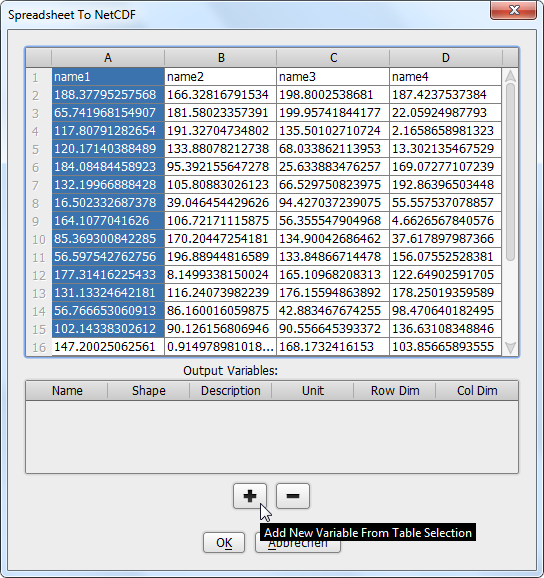
Choose a name for the variable and fill the field name as it is a mandatory field. All other fields can be filled at will.

In the next step select the values of your first data vector that is related to your reference. Give it a name and fill the field Row Dim with the name of the according reference. Dependend of your settings it could be necessary to fill the field Col Dim instead or too.
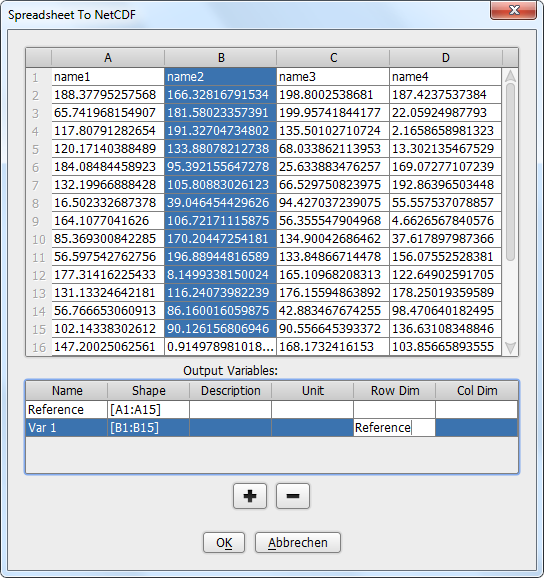
Click OK to confirm your settings and save the newly created NetCDF file on your volume. Now you can open it as descriped in the section Screening your data.