Pi Usage adds a compact status item for the active model:
Codex · 5h 92% (resets in 2h) · 7d 85% (resets in 5d 3h)
It also provides one command for detailed provider data and Skill statistics:
/usage
/usage skills
The status follows the active model. If a provider does not expose a balance or quota endpoint, Pi Usage says so instead of inventing a number. Network errors, missing authentication, unsupported providers, exhausted plans, and a real zero balance remain separate states.
| Pi terminal | pi-web |
|---|---|
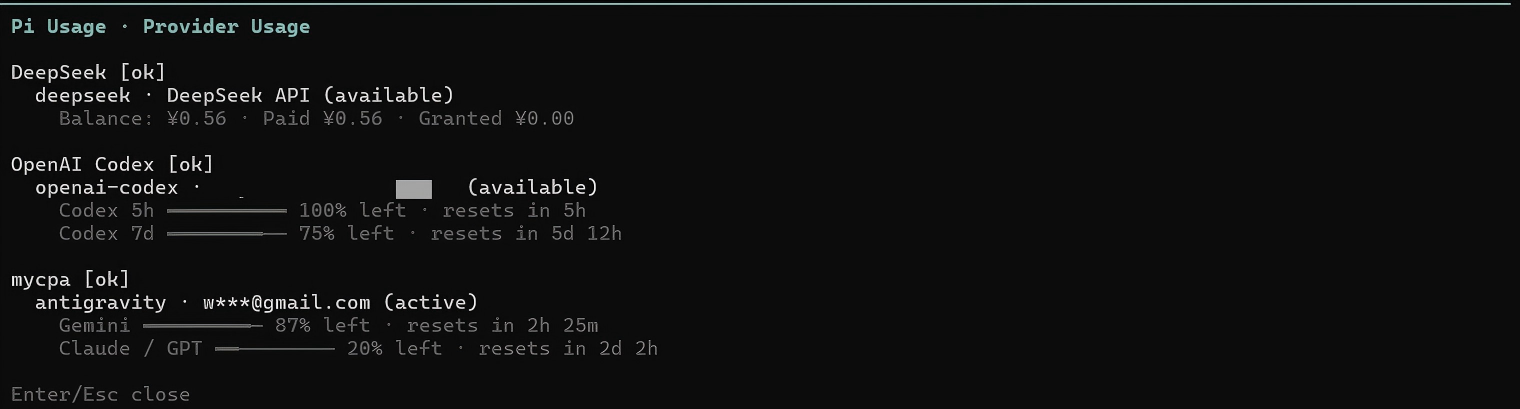 |
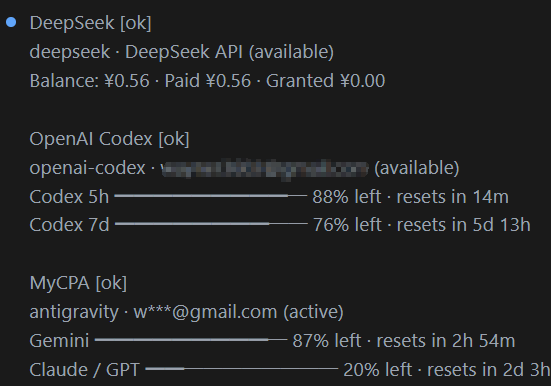 |
| Pi terminal | pi-web |
|---|---|
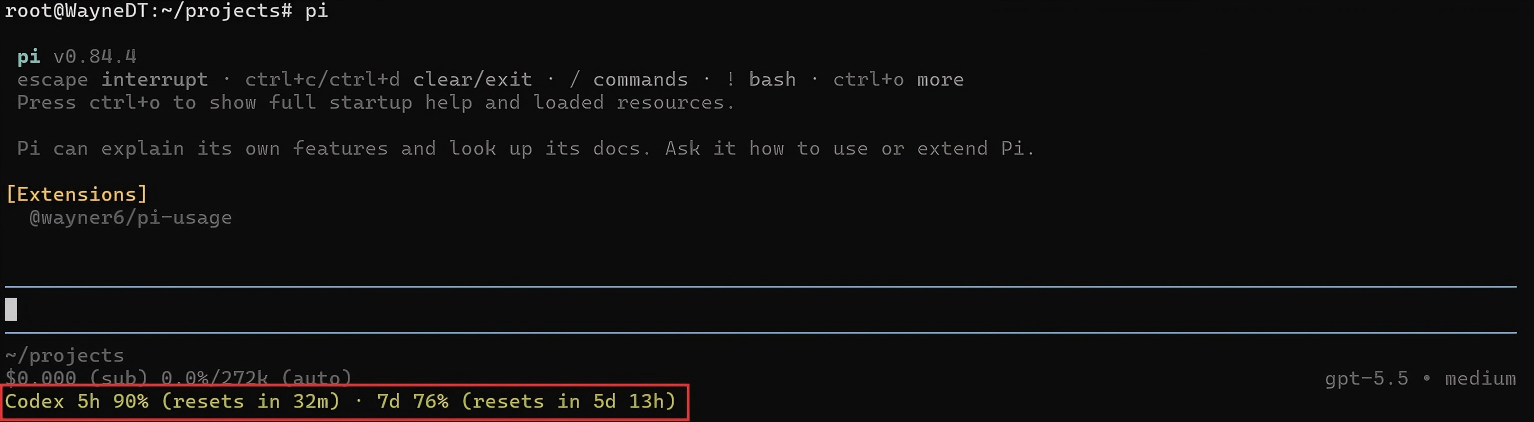 |
 |
Click an image to open the full-size version.
Choose npm or GitHub as the installation source.
# npm
pi install npm:@wayner6/pi-usage

# GitHub
pi install github:wayner6/pi-usageOpen Settings > Plugins > Add Plugin, choose the global scope, and enter one of these sources:
npm:@wayner6/pi-usage
git:https://github.com/wayner6/pi-usage
Reload the current session after installing or updating the plugin.
Pi Usage registers only the /usage command.
| Command | What it does |
|---|---|
/usage |
Shows all configured providers and their balances, quotas, or current state |
/usage all |
Same as /usage |
/usage current |
Shows data for the active model's provider |
/usage refresh |
Bypasses the cache and refreshes the active provider |
/usage doctor |
Shows the active model, adapter, authentication state, and bridge diagnostics |
/usage skills |
Lists every installed Skill and its accumulated use count, including zero |
/usage settings |
Shows the current plugin settings and configuration path |
Pi does not emit a dedicated skill_invoked event. Pi Usage detects a Skill activation when either of these happens:
- You run
/skill:name. - The model successfully reads the entry file of a Skill discovered by Pi.
The same Skill is counted once per agent run, so a /skill:name command followed by a read of its SKILL.md adds one use, not two. Counts begin after Skill tracking is installed and enabled. Old sessions are not scanned.
/usage skills always includes every Skill currently discovered by Pi. Skills that have not been used show 0.
| Provider | Level | Authentication | Displayed data |
|---|---|---|---|
| OpenAI Codex | Full quota | ChatGPT Plus/Pro OAuth | 5-hour and 7-day quota with reset times |
| Anthropic Claude | Full or limited | Claude OAuth or API key | OAuth subscription windows; API keys show request/token rate-limit headroom |
| DeepSeek | Balance | API key | Official balances by currency |
| GLM / Zhipu BigModel | Full or limited | API key | Coding Plan 5-hour and 7-day quota; standard keys have no official balance query |
| OpenRouter | Balance | OAuth-resolved key or API key | Account balance or key limit, plus usage |
| OpenCode Go | Full quota | API key | Rolling 5-hour, weekly, and monthly windows |
| Kimi Code | Quota or status | Kimi OAuth or Kimi Code API key | 5-hour and weekly quota, or No active quota |
| CLIProxyAPI | Upstream-dependent | Proxy API key and server-side pi-bridge |
Only accounts and pools returned by pi-bridge |
| xAI / Grok | Status only | OAuth | Account identity and active or spending-limit state |
| Google Vertex AI | Unsupported | API key, ADC, or service account | Unsupported |
| Google Gemini API / AI Studio | Unsupported | API key | No supported official account balance or quota endpoint |
Native providers are queried through their official origins using authentication resolved by Pi. Reset countdowns are shown only when the provider returns a reset timestamp.
For CLIProxyAPI, install pi-bridge on the CLIProxyAPI server. Pi Usage uses the normal proxy API key and never requests or stores the CLIProxyAPI Management Key. It displays only the accounts and quota pools returned by the bridge.
Proxy accounts are matched by model family and model ID. An unrelated model cannot reuse another provider's quota. Shared pools stay shared: Pi Usage does not turn one Antigravity pool into fictional 5-hour and weekly windows.
Google Vertex quotas depend on the project, region, model, metric, and IAM permissions. They cannot be represented as one subscription-style percentage, so Vertex is reported as unsupported.
| State | Meaning |
|---|---|
Unauthorized |
Pi could not resolve valid credentials, or the provider rejected them |
No active quota |
Authentication worked, but the account has no usable plan or credits |
Unsupported |
No safe, supported balance or quota integration exists |
Bridge Not Found |
CLIProxyAPI is reachable, but its pi-bridge endpoint is missing |
stale |
A refresh failed and the last successful result is being shown |
0% or zero balance |
The provider successfully reported a real zero value |
/usage settings status on|off       # compact status item, default: on
/usage settings widget on|off       # detailed widget below the editor, default: off
/usage settings skills on|off       # local Skill counting, default: on
/usage settings interval <seconds>  # automatic refresh, 30 to 3600, default: 120
/usage settings timeout <seconds>   # request timeout, 2 to 60, default: 10
Local files:
~/.pi/agent/pi-usage/config.json
~/.pi/agent/pi-usage/skill-usage.jsonl
The Skill log is append-only and stores only the Skill name and timestamp.
# Update Pi Usage installed from npm
pi update npm:@wayner6/pi-usage

# Update all installed extensions without updating Pi itself
pi update --extensions
In pi-web, open Settings > Plugins, update Pi Usage, and reload the session.
Pi Usage does not use browser cookies, telemetry, or cloud synchronization. It does not send credentials to third-party origins. Provider requests stay on validated official domains, while CLIProxyAPI requests stay on the configured proxy origin.
Skill counting does not store prompts, conversation text, tool output, or Skill contents.
Security reports are covered by SECURITY.md.
npm install
npm run verify
npm run pack:check
npm run verify runs TypeScript checks and the test suite. See CONTRIBUTING.md before submitting a change.
Thanks to the LINUX DO community for testing and discussion.