Repository navigation
chore: add README files and repository review #3
New issue
Have a question about this project? Sign up for a free GitHub account to open an issue and contact its maintainers and the community.
By clicking “Sign up for GitHub”, you agree to our terms of service and privacy statement. We’ll occasionally send you account related emails.
Already on GitHub? Sign in to your account
Merged
Merged
Changes from all commits
Commits
Show all changes
4 commits
Select commit
Hold shift + click to select a range
26ca67c
feat: Add README and a template for README to facilitate utilization …
Vlad-Andres 861e531
fix: Combined both READMEs into one + improved consistency + fix PR f…
Vlad-Andres 2b9a5d5
fix: PR feedback fixes, grammar and clarity improvements + add images…
Vlad-Andres b7e0b58
fix: small fixes according to PR feedback
Vlad-Andres File filter
Filter by extension
Conversations
Failed to load comments.
Loading
Jump to
Jump to file
Failed to load files.
Loading
Diff view
Diff view
There are no files selected for viewing
This file contains hidden or bidirectional Unicode text that may be interpreted or compiled differently than what appears below. To review, open the file in an editor that reveals hidden Unicode characters.
Learn more about bidirectional Unicode characters
| Original file line number | Diff line number | Diff line change |
|---|---|---|
| @@ -0,0 +1,197 @@ | ||
| # SoDa Research Project Boilerplate | ||
|
|
||
| ## General Information | ||
| > Supported languages: Python and R | ||
|
|
||
| > [!WARNING] | ||
| > This template is NOT suitable for R or Python package development. | ||
|
|
||
| > __R packages:__ Bundles of collections of R functions designed to be shared across projects and potentially published on CRAN. Read more about R package development in this [book](https://r-pkgs.org/). An accessible guide to developing R packages is available [here](https://www.paulamoraga.com/blog/2022-04-12-rpackages.html). | ||
|
|
||
| > __Python packages:__ Installable bundles of Python code that can be shared across projects and potentially published on [PyPI](https://pypi.org/). If you want to develop a Python package, follow the official [Python Packaging User Guide](https://packaging.python.org/en/latest/tutorials/packaging-projects/) or, if you use uv, its [packaging documentation](https://docs.astral.sh/uv/concepts/projects/init/#packaged-applications). | ||
|
|
||
| This repository contains the template of a typical research project within the SoDa organisation. It can be used as a starting point for a new research project. | ||
|
|
||
| ### Getting started | ||
|
|
||
| To use this template for your new project, follow these steps in order: | ||
|
|
||
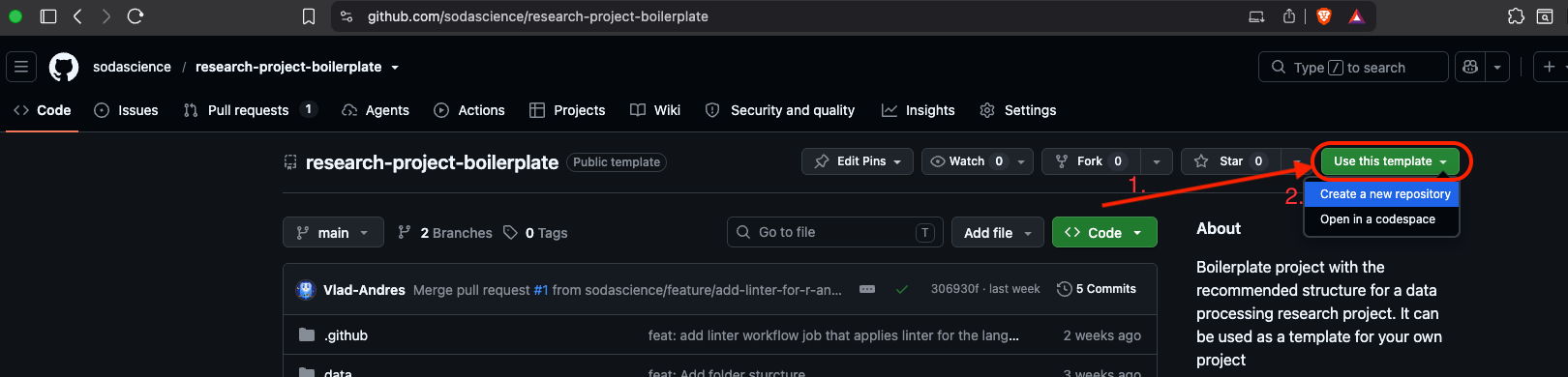
| #### Step 1 - Create your own repository from this template | ||
| Click the green button at the top of the page labelled as "Use this template" and choose "Create a new repository". | ||
|  | ||
|
|
||
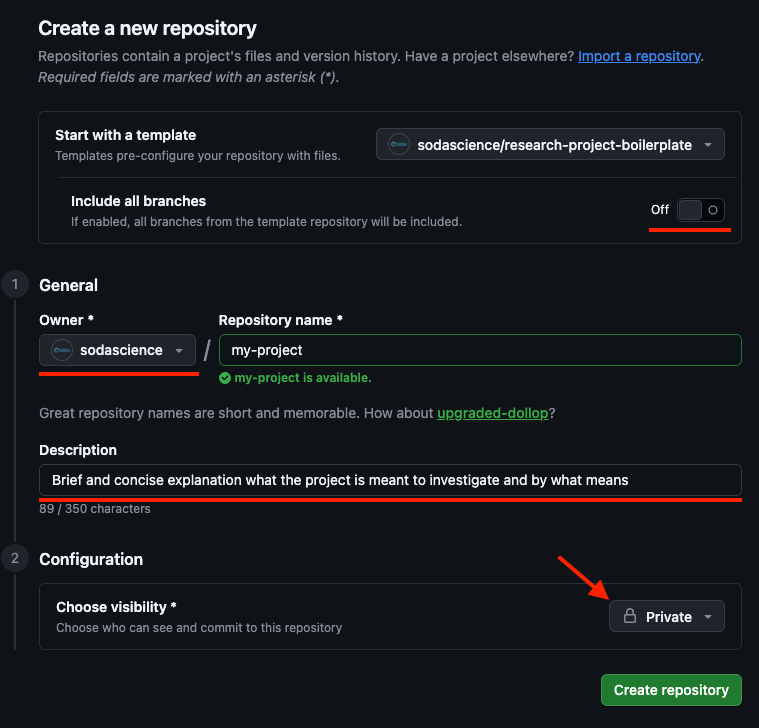
| #### Step 2 - Configure your new repository | ||
| - Keep 'Include all branches' switched off | ||
| - Choose "Owner" as "sodascience" | ||
| - Choose a name for your new repository | ||
| - Add a brief description, it will be displayed in a "About" side-section of your repository. | ||
| - Adjust the visibility of your repository (public or private). | ||
|
|
||
| > Private repositories are visible/accessible only for the owner and other manually assigned contributors. **Note:** visibility only controls who can *see* the content of the repository — it does not change our no-sensitive-data-in-git policy, which means that even in a private repo, sensitive data should never be committed to git. | ||
|
|
||
|  | ||
|
|
||
| #### Step 3 - Clean up placeholder files | ||
|
|
||
| Remove pre-configured `.gitkeep` files from folders you don't want to be tracked in git, or from folders to which you added some git-tracked files. The `.gitkeep` files should be there only if some folder you want to be uploaded to github does not contain any tracked files or is empty. Read more about these `gitkeep` files below. | ||
|
|
||
| > **What is a `.gitkeep` file?** Git only tracks files, not empty folders — so an empty folder like `data/raw/` would simply disappear when someone else clones the repo. To keep the folder structure visible and intact, we add an empty placeholder file named `.gitkeep` inside it. So, we used `.gitkeep` files to make sure your new project repo has the same folder structure as this template. Once a folder contains real files, the placeholder no longer serves a purpose, so you can safely delete it. If you don't need a folder at all (e.g. `notebooks/` if you won't use notebooks), you can delete the whole folder. | ||
|
Vlad-Andres marked this conversation as resolved.
Resolved
|
||
|
|
||
| #### Step 4 - Review the included GitHub Actions workflow | ||
|
|
||
| The current `.github` folder contains a simple linter job that checks your code for formatting errors. It runs automatically every time you push changes to your remote repository or open a pull request. It is recommended to keep it as is; if you want to develop project-specific workflows, refer to GitHub's [official documentation about workflows](https://docs.github.com/en/actions/using-workflows/about-workflows). | ||
|
|
||
| #### Step 5 — Fill in your README | ||
|
|
||
| Once you've completed these steps, you're ready to start working on your project. Scroll down to the [README template](#readme-template) below and follow the instructions there. | ||
|
|
||
| ### Folder Structure | ||
| The structure that we created here is common good practice for research projects, and we recommend sticking to it — whether your project uses Python, R, or both. Nevertheless, feel free to extend/change it to your needs. Here is a short description of the folders and files: | ||
|
|
||
| ``` | ||
| ├── .github/ # GitHub Actions workflows & configurations | ||
| ├── data/ # Raw and processed data | ||
| │ ├── raw/ # Raw data (read-only) | ||
| │ └── processed/ # Data processed by scripts | ||
| ├── notebooks/ # Exploration & analysis: Jupyter (.ipynb) or R Markdown/Quarto (.Rmd / .qmd) | ||
| ├── src/ # Main folder for source code (scripts) | ||
| ├── .gitignore # Specifies files to ignore in version control | ||
| ├── LICENSE.txt # Project license | ||
| ├── README.md # Project overview and documentation | ||
| └── env.example # Example environment variables | ||
| ``` | ||
|
|
||
| > **Dependency management files** | ||
| Files like `pyproject.toml`/`uv.lock` for Python, `renv.lock` for R, and an `.Rproj` (generated by RStudio) aren't included in this template — add them as needed once you set up your environment. | ||
|
|
||
| > **What are `env.example` and `.env` files?** | ||
| Projects often need secrets (API keys, passwords, or other sensitive values that must never be published on GitHub, public or private) and machine-specific settings like file paths. The convention is to list these as placeholders in `env.example`, which **IS** committed to the repo. Each contributor then **copies it to a new file named `.env` locally** and fills in their own real values. | ||
|
|
||
| Conveniently, we already set up a `.gitignore` (a file that contains files and directories that should **NOT** be pushed to remote repositories) for you such that the real `.env` file will never be pushed to the remote repository. Therefore you can locally create a `.env` file in the root directory. | ||
|
|
||
| > [!IMPORTANT] | ||
| > Do not delete `.gitignore` file. If you delete it, the real `.env` file as well as other files that are supposed to be excluded from GitHub will be pushed. | ||
|
|
||
| ``` | ||
| # Example of .env.example | ||
|
|
||
| OPENAI_API_KEY="set_your_openai_api_key_here" | ||
| HUGGINGFACE_TOKEN="set_your_huggingface_token_here" | ||
| PROJECT_FOLDER_PATH="set_path_to_your_project_folder_here" | ||
| RAW_DATA_DIR="set_path_to_local_or_restricted_raw_data_folder_here" | ||
| ZENODO_TOKEN="set_your_zenodo_access_token_here" | ||
| ``` | ||
|
|
||
| ``` | ||
| # Example of .env file | ||
|
|
||
| OPENAI_API_KEY="sk-proj-sMEO8Gi82VT5WTy9UiiEpuPtPMRBmgha" | ||
| HUGGINGFACE_TOKEN="cunTTJINJzvqMdDbgxzZAa26Z2isZABf" | ||
| PROJECT_FOLDER_PATH="/project-name" | ||
| RAW_DATA_DIR="data/raw" | ||
| ZENODO_TOKEN="BFLvsDh1Qe2lecmzmNu3CjePV310qett" | ||
| ``` | ||
|
|
||
| ## README template | ||
|
|
||
| > [!NOTE] | ||
| > Please delete everything above this section from the README. Therefore, you will end up with a clean template for your project README file. Make sure to replace all placeholders below (marked as `[PROJECT NAME]`, etc.) with your project-specific information. | ||
|
|
||
| # [PROJECT NAME] | ||
|
|
||
| The badges below are placeholders — update or remove them to match your project. See [shields.io](https://shields.io/badges) for creating custom badges. | ||
|
|
||
| [](https://www.repostatus.org/#active) | ||
|
Vlad-Andres marked this conversation as resolved.
Resolved
|
||
| [](https://zenodo.org/doi/10.5281/zenodo.XXXXXXX) | ||
|  | ||
| [](https://pypi.org/project/your-package-name/) <!-- TODO: adjust/remove --> | ||
| [](https://anaconda.org/conda-forge/your-package-name) <!-- TODO: adjust/remove --> | ||
| [](https://github.com/sodascience/your-repo) <!-- TODO: adjust/remove --> | ||
|
|
||
| > [!NOTE] | ||
| > The following table is for explanation purposes, please remove it in your final version of the README. | ||
|
|
||
| **Project status options** ([repostatus.org](https://www.repostatus.org/)): | ||
|
|
||
| | Status | Meaning | | ||
| |---|---| | ||
| | `concept` | No real implementation yet — demo/proof-of-concept only | | ||
| | `wip` | In development, no stable/usable release yet | | ||
| | `suspended` | Development paused, but intended to resume | | ||
| | `abandoned` | Stopped for good, no stable release was ever reached | | ||
| | `active` | Stable, usable, and actively maintained | | ||
| | `inactive` | Stable and usable, but no longer actively developed | | ||
| | `unsupported` | Stable, usable, but author(s) have stopped all support | | ||
| | `moved` | Repo relocated — see [repostatus.org/#moved](https://www.repostatus.org/#moved) for the required alt-text format | | ||
| --- | ||
|
|
||
| __Project Goal and Description__ - Add a brief description of the project. What is the problem you are trying to solve? What is your proposed solution? What is the impact of your project? | ||
|
|
||
| ## Highlights | ||
| - Add highlights of your project. These can be anything that you think is important to mention. | ||
|
|
||
| ## Folder Structure | ||
|
|
||
| Here is the initial folder structure of the project established in the template that you used to create your own project. Adjust it to reflect the actual folder structure of your project and describe certain important directories. | ||
|
|
||
| ``` | ||
| ├── .github/ # GitHub Actions workflows & configurations | ||
| ├── data/ # Raw and processed data | ||
| │ ├── raw/ # Raw data (read-only) | ||
| │ └── processed/ # Data processed by scripts | ||
| ├── notebooks/ # Exploration & analysis: Jupyter (.ipynb) or R Markdown/Quarto (.Rmd / .qmd) | ||
| ├── src/ # Main folder for source code (scripts) | ||
| ├── .gitignore # Specifies files to ignore in version control | ||
| ├── LICENSE.txt # Project license | ||
| ├── README.md # Project overview and documentation | ||
| └── env.example # Example environment variables | ||
| ``` | ||
|
|
||
| ## Installation | ||
| Add installation instructions here. For example, for a pipeline with multiple stages, you can show the commands that run each stage separately like the following: | ||
|
|
||
| Example installation instructions for python: | ||
| ```sh | ||
| # Python (uv) | ||
| uv sync | ||
| uv run python main.py --stage preprocessing | ||
| uv run python main.py --stage modelling | ||
| ``` | ||
|
|
||
| Example installation instructions for R: | ||
| ```r | ||
| # R (renv) — run from the terminal | ||
| Rscript -e "renv::restore()" | ||
| Rscript main.R | ||
| ``` | ||
|
|
||
| ## Usage | ||
| Add a brief description of how to use your project. | ||
|
|
||
| ## Citation | ||
|
|
||
| Provide a citation for your project. We recommend using either the bibtex format or APA, or both. Bibtex is convenient for LaTeX users, while APA is commonly used in many social sciences. | ||
|
|
||
| For example: | ||
|
|
||
| ```bibtex | ||
| @software{[project_name], | ||
| author = {[Author Name]}, | ||
| title = {[Project Name]}, | ||
| year = {[Year]}, | ||
| doi = {10.5281/zenodo.XXXXXXX}, | ||
| url = {https://github.com/sodascience/[PROJECT_NAME]} | ||
| } | ||
| ``` | ||
|
|
||
| ## Contributing | ||
|
|
||
| Contributions are welcome! Please see our [contribution guidelines](https://github.com/sodascience/Github_Manifest) for details on branching strategy, commit conventions and recommendations for pull requests process. | ||
|
|
||
| Found a bug or have suggestions? Feel free to open an issue in the [issue tracker](https://github.com/sodascience/[PROJECT_NAME]/issues) | ||
|
|
||
| ## Contact | ||
| **[PROJECT NAME]** is a project by the [ODISSEI Social Data Science (SoDa)](https://odissei-data.nl/nl/soda/) team. | ||
| Do you have questions, suggestions, or remarks on the technical implementation? Create an issue in the [issue tracker](https://github.com/sodascience/[PROJECT_NAME]/issues) or feel free to contact [Contact Person](https://github.com/ContactPerson). | ||
|
|
||
| <img src="img/logos/soda.png" alt="SoDa logo" width="250px"/> | ||

Loading
Sorry, something went wrong. Reload?
Sorry, we cannot display this file.
Sorry, this file is invalid so it cannot be displayed.
Oops, something went wrong.
Add this suggestion to a batch that can be applied as a single commit.
This suggestion is invalid because no changes were made to the code.
Suggestions cannot be applied while the pull request is closed.
Suggestions cannot be applied while viewing a subset of changes.
Only one suggestion per line can be applied in a batch.
Add this suggestion to a batch that can be applied as a single commit.
Applying suggestions on deleted lines is not supported.
You must change the existing code in this line in order to create a valid suggestion.
Outdated suggestions cannot be applied.
This suggestion has been applied or marked resolved.
Suggestions cannot be applied from pending reviews.
Suggestions cannot be applied on multi-line comments.
Suggestions cannot be applied while the pull request is queued to merge.
Suggestion cannot be applied right now. Please check back later.
Uh oh!
There was an error while loading. Please reload this page.