







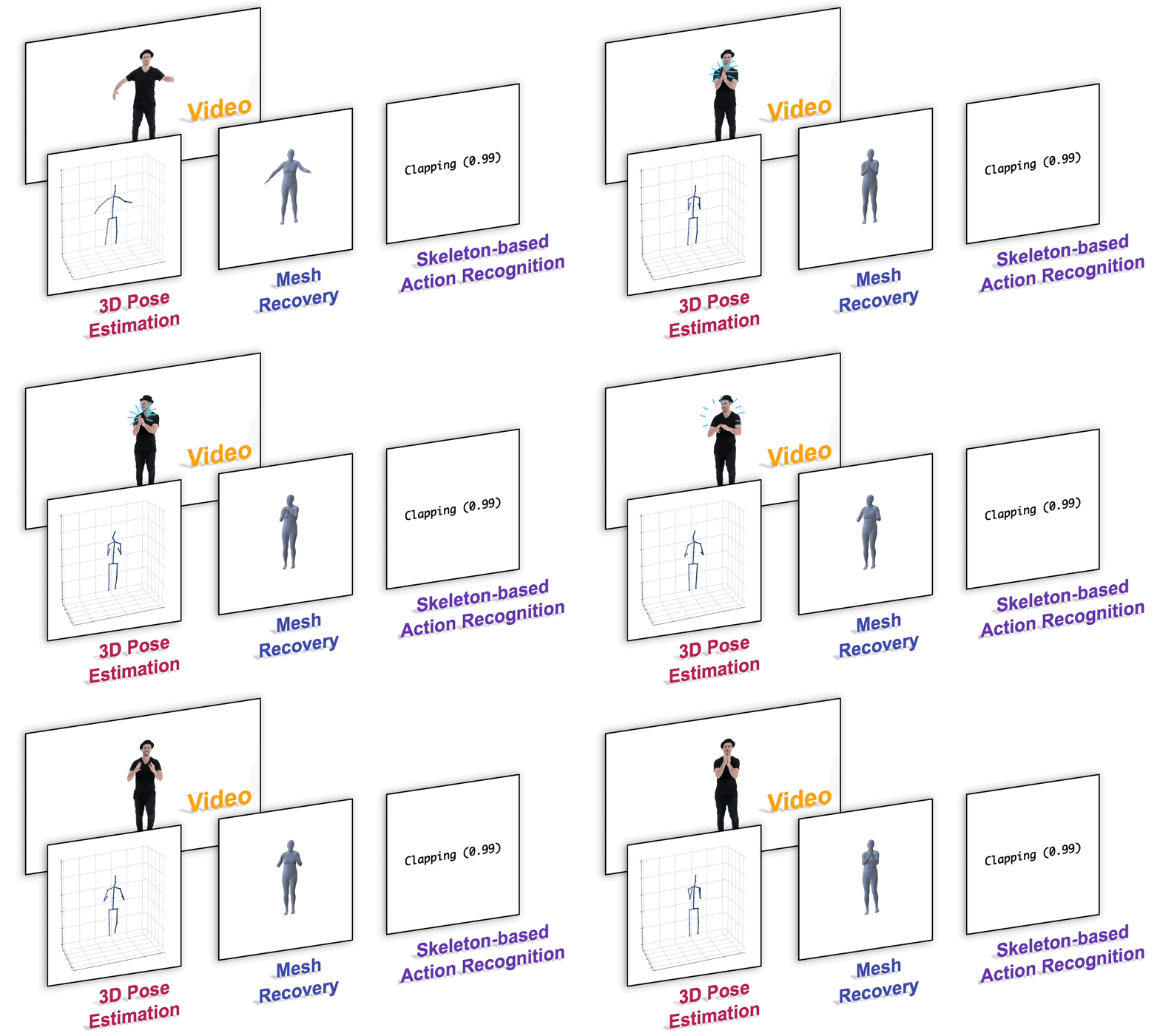
This is the official PyTorch implementation of the paper "MotionBERT: A Unified Perspective on Learning Human Motion Representations" (ICCV 2023).
conda create -n motionbert python=3.7 anaconda
conda activate motionbert
# Please install PyTorch according to your CUDA version.
conda install pytorch torchvision torchaudio pytorch-cuda=11.6 -c pytorch -c nvidia
pip install -r requirements.txt| Task | Document |
|---|---|
| Pretrain | docs/pretrain.md |
| 3D human pose estimation | docs/pose3d.md |
| Skeleton-based action recognition | docs/action.md |
| Mesh recovery | docs/mesh.md |
| MA-52 Micro-Action Recognition | See section below |
This repository has been adapted to train MotionBERT on the MA-52 (Micro-Action-52) dataset for micro-action recognition. Micro-actions are imperceptible non-verbal behaviors characterized by low-intensity movements that offer insights into human feelings and intentions, making them valuable for emotion recognition and psychological assessment applications.
The MA-52 dataset, developed by VUT-HFUT, contains:
- 52 micro-action categories covering comprehensive human micro-behaviors
- 22,422 video instances from 205 participants
- Whole-body perspective including gestures, upper- and lower-limb movements
- 7 body part labels for detailed analysis
- Realistic psychological interview scenarios providing natural micro-action data
The dataset includes 52 distinct micro-action categories organized by body regions:
- A1: Shaking body
- A2: Turning around
- A3: Sitting straightly
- A4: Leaning forward
- A5: Leaning backward
- A6: Swaying body
- B1: Nodding
- B2: Shaking head
- B3: Turning head
- B4: Tilting head
- B5: Lowering head
- B6: Raising head
- B7: Scratching head
- B8: Touching head
- B9: Supporting head
- C1: Crossing arms
- C2: Folding arms
- C3: Waving hands
- C4: Clapping hands
- C5: Rubbing hands
- C6: Interlocking fingers
- C7: Covering face
- C8: Touching face
- C9: Touching chin
- C10: Touching nose
- C11: Touching mouth
- C12: Touching neck
- C13: Touching chest
- C14: Touching shoulder
- C15: Touching arm
- C16: Pointing
- C17: Gesturing
- C18: Adjusting clothes
- C19: Scratching
- C20: Fidgeting
- D1: Crossing legs
- D2: Uncrossing legs
- D3: Stretching legs
- D4: Shaking legs
- D5: Tapping feet
- D6: Stamping feet
- D7: Moving feet
- D8: Adjusting sitting position
- D9: Touching thigh
- D10: Touching knee
- D11: Touching calf
- D12: Touching ankle
- D13: Touching foot
- D14: Adjusting shoes
- D15: Kicking
- D16: Stepping
- D17: Shifting weight
This comprehensive categorization enables detailed analysis of human micro-behaviors across different body regions for psychological and emotional assessment applications.
The MA-52 dataset should be organized as follows:
data/
├── train/
│   ├── A1_sample_001/
│   │   └── pose_3d.npy          # 3D pose data (T, 17, 3)
│   ├── B3_sample_002/
│   │   └── pose_3d.npy
│   ├── C5_sample_003/
│   │   └── pose_3d.npy
│   └── ...
├── test/
│   ├── A2_sample_100/
│   │   └── pose_3d.npy
│   └── ...
├── train_labels.txt              # Training labels (0-51 for 52 classes)
└── test_labels.txt               # Testing labels
- Format: NumPy array with shape
(T, 17, 3) - T: Number of frames (variable length, will be resampled to 243)
- 17: Number of joints (H36M format)
- 3: Coordinates (x, y, z in meters)
H36M Joint Order:
joints = [
    'Pelvis',     'R_Hip',      'R_Knee',     'R_Ankle',    # 0-3
    'L_Hip',      'L_Knee',     'L_Ankle',    'Spine1',     # 4-7
    'Neck',       'Head',       'Head_top',   'L_Shoulder', # 8-11
    'L_Elbow',    'L_Wrist',    'R_Shoulder', 'R_Elbow',    # 12-15
    'R_Wrist'                                               # 16
]Each line contains: folder_name class_id (class_id ranges from 0-51 for 52 micro-actions)
A1_sample_001 0    # A1: Shaking body
B3_sample_002 11   # B3: Turning head
C5_sample_003 17   # C5: Rubbing hands
D1_sample_004 26   # D1: Crossing legs
...
# Download MA-52 dataset from Hugging Face
# Visit: https://huggingface.co/datasets/kunli-cs/MA-52
# Or use the official application form for access

# Organize MA-52 dataset according to the structure above
mkdir -p data/train data/test

# Convert MA-52 video data to 3D pose format
python tools/convert_ma52_to_pose3d.py --input ma52_videos --output data/

# Verify data format
python verify_data_format.pyEdit configs/action/MB_train_custom.yaml:
# Data settings
data_root: data                    # Path to MA-52 data directory
action_classes: 52                 # MA-52 has 52 micro-action classes
clip_len: 243                      # Fixed sequence length for micro-actions

# Training settings
epochs: 300
batch_size: 24                     # Optimized for better GPU utilization
lr_backbone: 0.00001               # Lower learning rate for backbone
lr_head: 0.00008                   # Slightly higher learning rate for head
weight_decay: 0.1                  # Increased regularization
lr_decay: 0.98                     # More aggressive learning rate decay

# Model settings (Lighter architecture)
dim_feat: 192                      # Reduced feature dimension
depth: 2                           # Shallow transformer depth
dim_rep: 96                        # Reduced representation dimension
num_heads: 4                       # Fewer attention heads
hidden_dim: 64                     # Smaller hidden dimension
dropout_ratio: 0.7                 # Higher dropout for regularization

# Augmentation settings
random_move: True                  # Enable spatial augmentation
scale_range_train: [0.8, 3.2]     # Wider scale range for training
scale_range_test: [2, 2]          # Fixed scale for testing
normalize: True # Apply pose normalization# Train MotionBERT on MA-52 dataset
python train_action_custom.py
# Resume training from checkpoint
python train_action_custom.py --resume latest_epoch.bin
# Train with specific config
python train_action_custom.py --config configs/action/MB_train_custom.yaml# View training status
python monitor_training.py
# Launch TensorBoard
tensorboard --logdir checkpoint_custom/logs --port 6006
# Generate training plots
python monitor_training.py plot# Evaluate best checkpoint
python train_action_custom.py --evaluate best_epoch.bin
# Evaluate specific checkpoint
python train_action_custom.py --evaluate checkpoint_custom/epoch_100.binThe current configuration uses a lightweight MotionBERT architecture optimized for faster training and inference:
- Parameters: ~2.8M (vs ~25M in full model)
- Transformer Depth: 2 layers (vs 5 in full model)
- Feature Dimension: 192 (vs 512 in full model)
- Attention Heads: 4 (vs 8 in full model)
- Hidden Dimension: 64 (vs 2048 in full model)
- Dropout: 0.7 (higher regularization)
This lighter architecture provides:
- ✅ Faster training (~3x speedup)
- ✅ Lower memory usage
- ✅ Good performance on medium-scale datasets
- ✅ Better regularization with higher dropout
The custom training includes comprehensive data augmentation:
- Pose Normalization: Center around root joint, scale normalization
- Temporal Resampling: Random resampling to 243 frames
- Spatial Transformations:
- Random rotation: ±10 degrees
- Random scaling: 90%-110%
- Random translation: ±10%
- Crop & Scale: Normalize to [-1,1] + random scaling (0.8x-3.2x)
- Pose Normalization: Same as training
- Temporal Resampling: Deterministic resampling
- Crop & Scale: Fixed 2x scaling
- No Random Transformations: Consistent evaluation
INFO: Training samples: 17937 (MA-52 training set)
INFO: Test samples: 4485 (MA-52 test set)
INFO: Number of classes: 52 (MA-52 micro-actions)
INFO: Trainable parameter count: 2847628

Training epoch 0.
Train: [0][100/748]    BT 0.156 (0.164)    DT 0.089 (0.095)
Loss 3.892 (3.945)    Acc@1 12.5 (10.8)    Acc@5 35.4 (32.1)

Test: [100/187]    Time 0.134 (0.142)    Loss 3.756 (3.801)
Acc@1 15.2 (13.7)    Acc@5 38.9 (36.5)

Epoch 0 Summary:
  Train Loss: 3.945 | Train Acc@1: 10.8% | Train Acc@5: 32.1%
  Test Loss: 3.801 | Test Acc@1: 13.7% | Test Acc@5: 36.5%
  Best Acc@1: 13.7%
Learning Rate: 0.000010- Micro-Action Sensitivity: MA-52 contains subtle micro-actions that require careful pose estimation quality
- Class Balance: MA-52 has 52 fine-grained micro-action classes - ensure balanced training data
- Sequence Length: 243 frames works well for capturing micro-action temporal dynamics
- Model Architecture: Lightweight model (2.8M parameters) optimized for micro-action recognition
- Learning Rates: Lower backbone LR (0.00001) with higher head LR (0.00008) for micro-action fine-tuning
- Regularization: High dropout (0.7) and weight decay (0.1) prevent overfitting on similar micro-actions
- Batch Size: Larger batch size (24) improves training stability with 52 micro-action classes
- Augmentation: Wider scale range [0.8, 3.2] helps generalize across different body sizes and poses
- Body Region Focus: Consider the 4 main body regions (Body, Head, Upper Limb, Lower Limb) during analysis
- Psychological Context: MA-52 captures natural micro-behaviors from psychological interviews
Common Issues:
# Check data format
python verify_data_format.py

# Validate your dataset
python lib/data/dataset_custom.py  # Run the test function

# Monitor GPU usage
watch nvidia-smi

# Check training progress
tail -f checkpoint_custom/logs/events.out.tfevents.*
Data Preparation Scripts:
tools/convert_ma52_to_pose3d.py: Convert MA-52 video data to 3D pose formatverify_data_format.py: Validate MA-52 data structurelib/data/dataset_custom.py: Custom dataset implementation for MA-52
MA-52 Dataset Resources:
- MA-52 GitHub Repository
- MA-52 Dataset on Hugging Face
- MA-52 Dataset Paper (TCSVT 2024)
- VUT-HFUT Organization
Please refer to docs/inference.md.
'''
  x: 2D skeletons
    type = <class 'torch.Tensor'>
    shape = [batch size * frames * joints(17) * channels(3)]

  MotionBERT: pretrained human motion encoder
    type = <class 'lib.model.DSTformer.DSTformer'>

  E: encoded motion representation
    type = <class 'torch.Tensor'>
    shape = [batch size * frames * joints(17) * channels(512)]
'''
E = MotionBERT.get_representation(x)
Hints
- The model could handle different input lengths (no more than 243 frames). No need to explicitly specify the input length elsewhere.
- The model uses 17 body keypoints (H36M format). If you are using other formats, please convert them before feeding to MotionBERT.
- Please refer to model_action.py and model_mesh.py for examples of (easily) adapting MotionBERT to different downstream tasks.
- For RGB videos, you need to extract 2D poses (inference.md), convert the keypoint format (dataset_wild.py), and then feed to MotionBERT (infer_wild.py).
| Model | Download Link | Config | Performance |
|---|---|---|---|
| MotionBERT (162MB) | OneDrive | pretrain/MB_pretrain.yaml | - |
| MotionBERT-Lite (61MB) | OneDrive | pretrain/MB_lite.yaml | - |
| 3D Pose (H36M-SH, scratch) | OneDrive | pose3d/MB_train_h36m.yaml | 39.2mm (MPJPE) |
| 3D Pose (H36M-SH, ft) | OneDrive | pose3d/MB_ft_h36m.yaml | 37.2mm (MPJPE) |
| Action Recognition (x-sub, ft) | OneDrive | action/MB_ft_NTU60_xsub.yaml | 97.2% (Top1 Acc) |
| Action Recognition (x-view, ft) | OneDrive | action/MB_ft_NTU60_xview.yaml | 93.0% (Top1 Acc) |
| MA-52 Micro-Actions (custom) | Google Drive | action/MB_train_custom.yaml | 42.6% (Top1) / 79.9% (Top5) |
| Mesh (with 3DPW, ft) | OneDrive | mesh/MB_ft_pw3d.yaml | 88.1mm (MPVE) |
In most use cases (especially with finetuning), MotionBERT-Lite gives a similar performance with lower computation overhead.
-
Scripts and docs for pretraining
-
Demo for custom videos
If you find our work useful for your project, please consider citing the papers:
MotionBERT:
@inproceedings{motionbert2022,
  title     =   {MotionBERT: A Unified Perspective on Learning Human Motion Representations},
  author    =   {Zhu, Wentao and Ma, Xiaoxuan and Liu, Zhaoyang and Liu, Libin and Wu, Wayne and Wang, Yizhou},
  booktitle =   {Proceedings of the IEEE/CVF International Conference on Computer Vision},
  year      =   {2023},
}
MA-52 Dataset:
@article{guo2024benchmarking,
  title={Benchmarking Micro-action Recognition: Dataset, Methods, and Applications},
  author={Guo, Dan and Li, Kun and Hu, Bin and Zhang, Yan and Wang, Meng},
  journal={IEEE Transactions on Circuits and Systems for Video Technology},
  year={2024},
  volume={34},
  number={7},
  pages={6238-6252},
  publisher={IEEE},
  doi={10.1109/TCSVT.2024.3358415}
}

@article{li2024mmad,
  title={MMAD: Multi-label Micro-Action Detection in Videos},
  author={Li, Kun and Guo, Dan and Liu, Pengyu and Chen, Guoliang and Wang, Meng},
  journal={arXiv preprint arXiv:2407.05311},
  year={2024}
}

@misc{MicroAction2024,
  author       = {Guo, Dan and Li, Kun and Hu, Bin and Zhang, Yan and Wang, Meng},
  title        = {Micro-Action Benchmark},
  year         = {2024},
  howpublished = {\url{https://github.com/VUT-HFUT/Micro-Action}},
  note         = {Accessed: 2024-08-21}
}