

AI-powered image and video generation platform built with modern web technologies
Fantasize AI is a comprehensive AI-powered content generation platform that enables users to create stunning images and videos using cutting-edge AI models. The platform provides an intuitive interface for generating content, managing face models, purchasing token packs, and organizing generated media.
- AI Image Generation - Powered by Fal AI API
- AI Video Generation - Powered by Veo 3
- Face Model Training - Custom face model creation and management
- Token-based System - Credit-based consumption model
- Secure Payments - Razorpay integration for pack purchases
- Email Notifications - Automated order confirmations
-
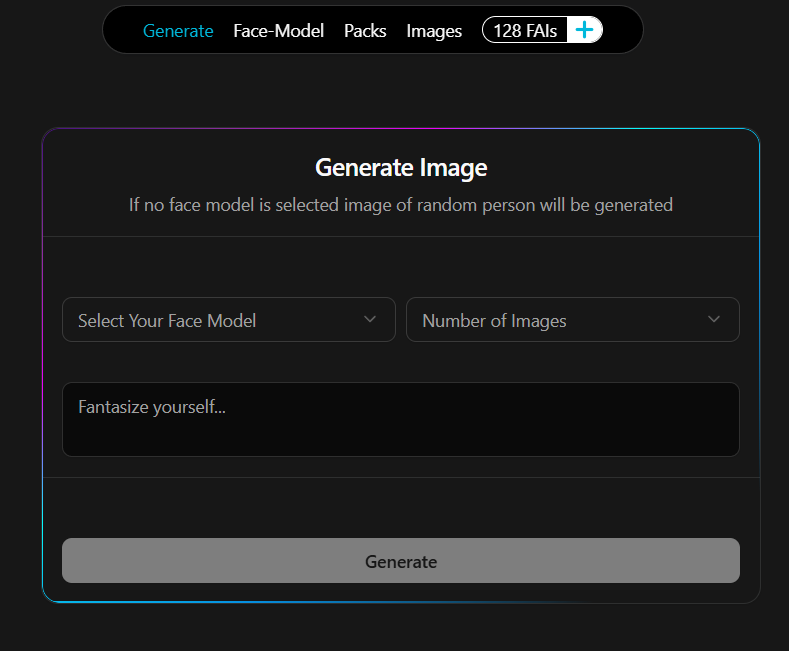
Generate Tab
- AI-powered image generation with customizable prompts
- Multiple style and parameter controls
- Real-time generation status
-
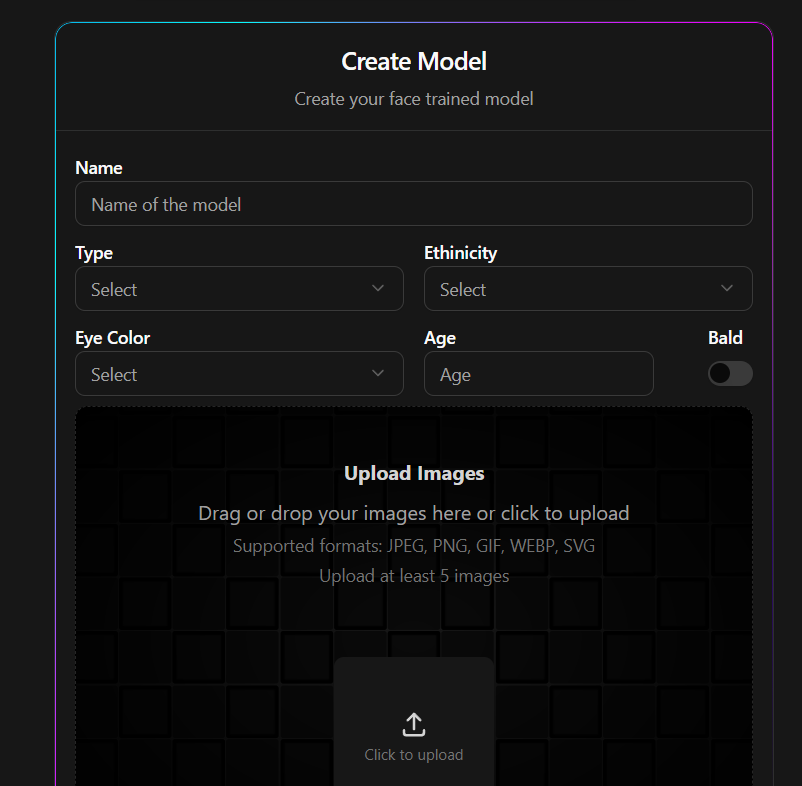
Face-Model Tab
- Upload and train custom face models
- Manage multiple face models
- Use trained models in generations
-
Packs Tab
- Purchase token packs via Razorpay
- Multiple pricing tiers
- Instant credit top-up

-
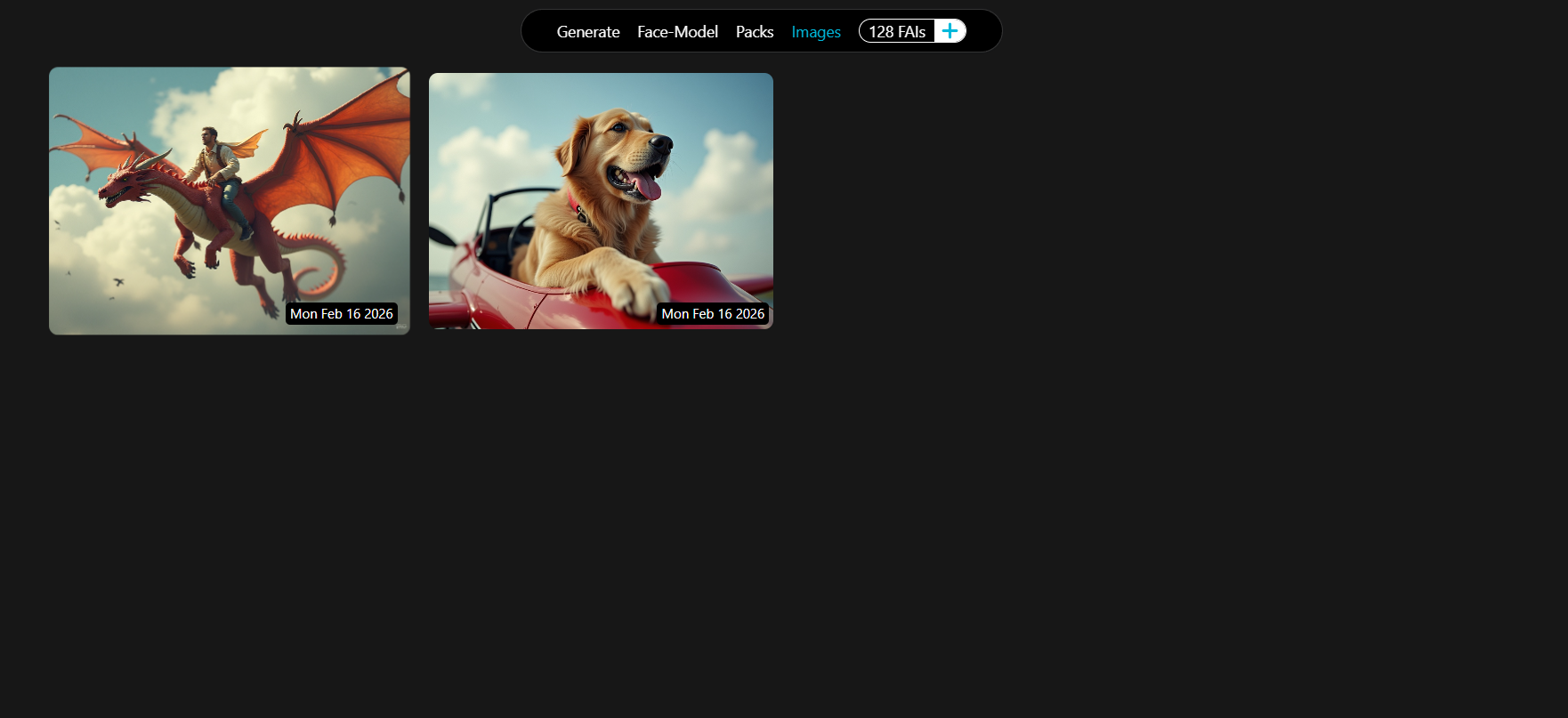
Images Tab
- Gallery view of all generated images
- Download and share functionality
- Organized by creation date
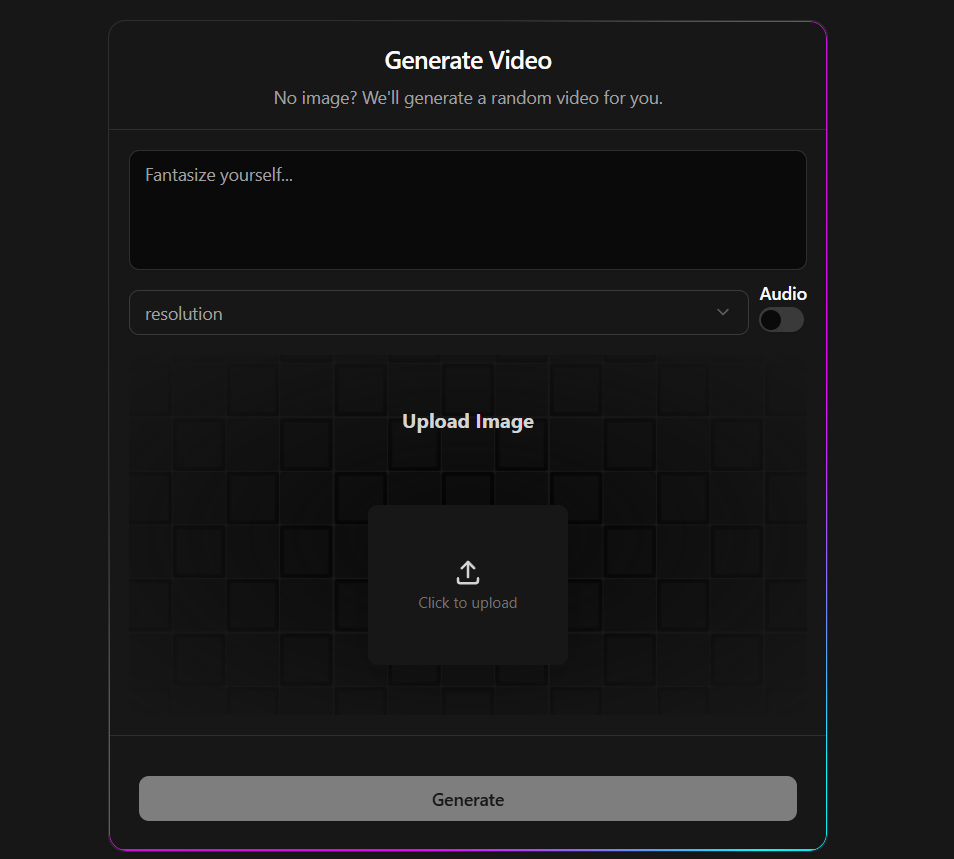
- Generate Video
- Text-to-video generation using Veo 3
- Customizable video parameters
- Progress tracking
- Videos Gallery
- View all generated videos
- Download and playback controls
- Cloud storage with presigned URLs
-
Token System
- Real-time token balance tracking
- Per-generation token consumption
- Token purchase history
-
User Authentication
- Secure authentication via Clerk
- Social login support
- User profile management
-
Email Notifications
- Order confirmation emails via Nodemailer
- Generation completion alerts
- Account activity notifications
- Framework: Next.js 15 (App Router)
- Language: TypeScript
- Styling: Tailwind CSS
- UI Components: Shadcn/ui, ActernityUi, MagicUi
- Runtime: Node.js
- API Routes: Next.js API Routes
- Database ORM: Prisma
- Database: PostgreSQL
- Authentication: Clerk
- File Storage: AWS S3 (Presigned URLs)
- Image Generation: Fal AI API
- Video Generation: Veo 3 API
- Payment Gateway: Razorpay
- Email Service: Nodemailer
- Monorepo: Turborepo
- CI/CD: GitHub Actions
- Deployment: AWS
- File Storage: S3
- Version Control: Git & GitHub
┌────────────────────────────────────────────────────────────────────────────┐
│                      Frontend (Next.js App Router)                         │
│                                                                            │
│  ┌──────────┐    ┌─────────────────────────────────────┐     ┌─────────┐   │
│  │ Landing  │    │          Dashboard                  │     │ Pricing │   │
│  │   Page   │───▶│  ┌───────────┐    ┌─────────────┐  │ ◀───│  Page   │   │
│  │          │    │  │  Images   │    │   Videos    │   │     │         │   │
│  │ Features │    │  │ (4 Tabs)  │    │  (Sidebar)  │   │     │  Token  │   │
│  │ Pricing  │    │  │           │    │             │   │     │  Packs  │   │
│  │ Auth     │    │  │ Generate  │    │  Generate   │   │     │         │   │
│  └──────────┘    │  │ Models    │    │  Gallery    │   │     └─────────┘   │
│                  │  │ Packs     │    └─────────────┘   │                   │
│                  │  │ Gallery   │                      │                   │
│                  │  └───────────┘                      │                   │
│                  └─────────────────────────────────────┘                   │
└────────────────────────────────────────────────────────────────────────────┘
                                      │
                                      ▼
┌───────────────────────────────────────────────────────────────────────┐
│                        API Layer (/api/v1)                            │
│                                                                       │
│  ┌─────────────┐  ┌─────────────┐  ┌─────────────┐  ┌─────────────┐   │
│  │    Auth     │  │     AI      │  │   Payment   │  │   Storage   │   │
│  │             │  │             │  │             │  │             │   │
│  │ Middleware  │  │ Generate    │  │ Razorpay    │  │ Presigned   │   │
│  │ Webhooks    │  │ Training    │  │ Orders      │  │ URLs        │   │
│  │             │  │ Video Gen   │  │ Verify      │  │ Uploads     │   │
│  └─────────────┘  └─────────────┘  └─────────────┘  └─────────────┘   │
│                                                                       │
│  ┌─────────────┐  ┌─────────────┐                                     │
│  │    Bulk     │  │    Pack     │                                     │
│  │             │  │             │                                     │
│  │ Images      │  │ Management  │                                     │
│  │ Videos      │  │ Bulk Ops    │                                     │
│  └─────────────┘  └─────────────┘                                     │
└───────────────────────────────────────────────────────────────────────┘
                                      │
                  ┌───────────────────┼───────────────────┐
                  ▼                   ▼                   ▼
      ┌───────────────────┐ ┌───────────────────┐ ┌───────────────────┐
      │      Clerk        │ │   Prisma + DB     │ │ External Services │
      │   Authentication  │ │   (PostgreSQL)    │ │                   │
      │                   │ │                   │ │                   │
      │ • User Management │ │ • Users           │ │ • Fal AI          │
      │ • Sessions        │ │ • Tokens          │ │   (Images)        │
      │ • Webhooks        │ │ • Orders          │ │                   │
      │ • Social Auth     │ │ • Images          │ │ • Google Veo 3    │
      │                   │ │ • Videos          │ │   (Videos)        │
      │                   │ │ • FaceModels      │ │                   │
      │                   │ │ • Packs           │ │ • Razorpay        │
      │                   │ │                   │ │   (Payments)      │
      │                   │ │                   │ │                   │
      │                   │ │                   │ │ • AWS S3          │
      │                   │ │                   │ │   (File Storage)  │
      │                   │ │                   │ │                   │
      │                   │ │                   │ │ • Nodemailer      │
      │                   │ │                   │ │   (Emails)        │
      └───────────────────┘ └───────────────────┘ └───────────────────┘
- User Authentication: Clerk handles sign-up/sign-in → Creates user in PostgreSQL
- Token Purchase: User buys tokens → Razorpay processes payment → Webhook updates database
- Image Generation: User submits prompt → API calls Fal AI → Stores in S3 → Returns presigned URL
- Face Model Training: User uploads images → Training API → Fal AI creates LoRA model → Stores model ID
- Video Generation: User submits prompt → API calls Veo 3 → Processes video → Stores in S3
- Email Notifications: Order completed → Nodemailer sends receipt → User receives confirmation
- Node.js 18.x or higher
- npm
- PostgreSQL database
- Accounts for:
- Clerk (Authentication)
- Fal AI (Image Generation)
- Veo 3 (Video Generation)
- Razorpay (Payments)
- AWS S3 (Storage)
- Clone the repository
git clone https://github.com/yourusername/fantasize-ai.git
cd fantasize-ai- Install dependencies
npm install- Set up environment variables
cp .env.example .env
# Edit .env with your credentials- Set up the database
cd packages/db

# Generate Prisma client
npx prisma generate

# Run migrations
npx prisma migrate dev

# Seed the database (optional)
npx prisma db seed- Run the development server
cd apps/web

npm run dev- Open the application
http://localhost:3000
Create a .env file in the root directory with the following variables:
# Database
DATABASE_URL=""

# Clerk Authentication
NEXT_PUBLIC_CLERK_PUBLISHABLE_KEY=
CLERK_SECRET_KEY=
NEXT_PUBLIC_CLERK_SIGN_IN_URL=/sign-in
NEXT_PUBLIC_CLERK_SIGN_UP_URL=/sign-up
NEXT_PUBLIC_CLERK_SIGN_IN_FALLBACK_REDIRECT_URL=/dashboard
NEXT_PUBLIC_CLERK_SIGN_UP_FALLBACK_REDIRECT_URL=/dashboard

# AI Services
FAL_KEY=

# AWS S3
accessKeyId=
secretAccessKey=
bucket=
AWS_REGION=us-east-1
endpoint=https://s3.us-east-1.amazonaws.com

# Razorpay
NEXT_PUBLIC_RAZORPAY_KEY_ID=
RazorpaySecret=
razorpayWebhookSecret=

# Email (Nodemailer)
EMAIL_USER=
EMAIL_PASS=fantasize-ai/
├── apps/
│ └── web/ # Next.js application with App Router
│ ├── app/ # Next.js App Router
│ │ ├── page.tsx # Landing page
│ │ ├── layout.tsx # Root layout
│ │ ├── config.ts # App configuration
│ │ ├── sign-in/ # Clerk authentication (sign-in)
│ │ ├── sign-up/ # Clerk authentication (sign-up)
│ │ ├── pricing/ # Pricing & token packages page
│ │ ├── dashboard/ # Protected dashboard with image/video sections
│ │ └── api/v1/ # API routes (AI generation, payments, S3, bulk operations)
│ ├── components/ # React components
│ │ ├── ui/ # Shadcn UI components (button, card, dialog, etc.)
│ │ ├── manualComponents/ # Custom feature components (GenerateImage, Videos, Packs)
│ │ └── magicui/ # Magic UI effects (animations, gradients, hover effects)
│ ├── lib/ # Utility functions
│ ├── models/ # TypeScript type definitions
│ ├── hooks/ # Custom React hooks
│ ├── public/ # Static assets (logos, images, videos)
│ ├── middleware.ts # Clerk authentication middleware
│ ├── next.config.js # Next.js configuration
│ ├── tailwind.config.ts # Tailwind CSS configuration
│ ├── Dockerfile # Docker container setup
│ └── package.json
│
├── packages/ # Turborepo shared packages
│ ├── db/ # Prisma database package (schema, migrations, client)
│ ├── ui/ # Shared UI components library
│ ├── typescript-config/ # Shared TypeScript configurations
│ ├── eslint-config/ # Shared ESLint rules
│ └── common/ # Common utilities and types
│
├── .github/workflows/ # CI/CD pipelines (build, test, deploy)
├── turbo.json # Turborepo configuration
├── package.json # Root workspace dependencies
└── README.md # Project documentation
| Feature | Cost | Details |
|---|---|---|
| 🖼️ Image Generation | 1 Token | 720p/1080p quality |
| 🤖 Face Model Training | 20 Tokens | Custom LoRA model |
| 🎞️ Video (No Audio) | 8 Tokens | 720p/1080p quality |
| 🎬 Video (With Audio) | 10 Tokens | 720p/1080p quality |
| Plan | Price | Tokens | Discount | Best For |
|---|---|---|---|---|
| Starter 🟢 | ₹100 | 5 | - | First-time users |
| Value 🔵 | 14 | 17% | Casual creators | |
| Pro 🟣 | 30 | 23% | Regular users + model training | |
| Ultimate 🟡 | 62 | 29% | Professionals & heavy users |
- Authentication: Clerk handles all user authentication and session management
- API Security: All API routes are protected with Clerk middleware
- Payment Security: Razorpay handles all payment processing
- Data Encryption: All sensitive data is encrypted at rest
- Webhook Verification: All webhooks are verified using signatures
We welcome contributions! Please follow these steps:
- Fork the repository
- Create a feature branch (
git checkout -b feature/AmazingFeature) - Commit your changes (
git commit -m 'Add some AmazingFeature') - Push to the branch (
git push origin feature/AmazingFeature) - Open a Pull Request
- Follow the existing code style
- Run
npm run lintbefore committing - Write meaningful commit messages
- Add tests for new features
For support, email support@fantasize-ai.com.
Made with ❤️ by VatsalCodes44