📌 适用于
- 快速连接 NPS 服务器
- 所有配置均在 Web 管理端完成
- 客户端仅需运行一条命令
📌 普通连接(TCP 模式)
./npc -server=ip:8024 -vkey=web界面中显示的密钥 -type=tcp📌 TLS 加密连接(安全模式)
./npc -server=ip:8025 -vkey=web界面中显示的密钥 -type=tls📌 连接多个服务端
./npc install -server=xx:12,yy:34 -vkey=xx,yy -type=tcp,tls📌 说明:
- 默认端口
8024为非 TLS 端口,用于普通 TCP 连接- 如果
-type=tls,必须使用8025作为 TLS 端口,否则连接失败
📌 适用于
- 保证 NPC 在服务器重启后自动运行
- 无需手动启动,后台运行
# 普通连接(TCP)
sudo ./npc install -server=ip:8024 -vkey=xxx -type=tcp -log=off
# TLS 加密连接(安全模式)
sudo ./npc install -server=ip:8025 -vkey=xxx -type=tls -log=off
# 连接多个服务端
sudo ./npc install -server=xx:12,yy:34 -vkey=xx,yy -type=tcp,tls -log=off

# 启动服务
sudo npc start
# 停止服务
sudo npc stop
# 卸载(修改参数时需要先卸载再重新注册)
sudo npc uninstall# 普通连接(TCP)
npc.exe install -server=ip:8024 -vkey=xxx -type=tcp -log=off
# TLS 加密连接(安全模式)
npc.exe install -server=ip:8025 -vkey=xxx -type=tls -log=off
# 连接多个服务端
npc.exe install -server=xx:12,yy:34 -vkey=xx,yy -type=tcp,tls -log=off
# 启动服务
npc.exe start
# 停止服务
npc.exe stop
# 安装
npc.exe install 其他参数(例如 -server=xx,yy -vkey=xx,yy -type=tcp,tls或者-config=xxx,yyy -log=off)
# 卸载(修改参数时需要先卸载再重新注册)
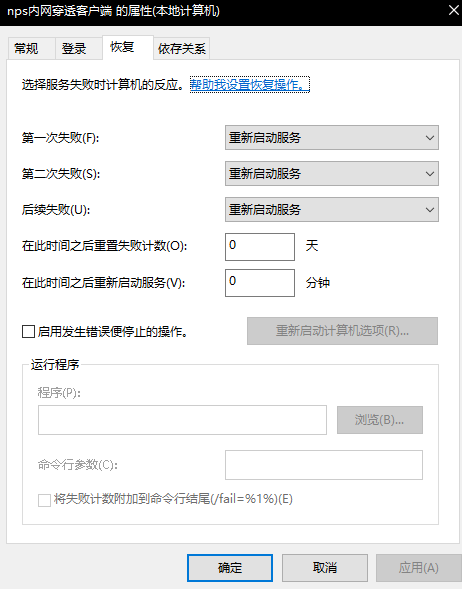
npc.exe uninstall📌 Windows 客户端退出后自动重启:
请按照以下图示配置 Windows 任务计划:
📌 日志文件位置:可通过参数配置
- Windows:当前运行目录下
- Linux/macOS:
/var/log/npc.log
📌 首先进入到对应的客户端二进制文件目录
- 先停止 NPC
sudo npc stop  # Linux/macOS
npc.exe stop  # Windows
- 执行更新
sudo npc-update update  # Linux/macOS
npc-update.exe update  # Windows
- 重新启动 NPC
sudo npc start  # Linux/macOS
npc.exe start  # Windows
📌 如果更新失败,请 手动下载 最新版本,然后覆盖原有的 npc 文件。
📌 适用于
- 不使用 Web 配置
- 使用
nps的公钥或客户端私钥进行验证 - 可在
npc.conf文件中完成所有设置
📌 启动 NPC
./npc -config=/path/to/npc.conf
# 支持传入多个配置文件多开
./npc -config=/path/to/npc1.conf,/path/to/npc2.conf
📌 示例配置文件:
📌 示例 npc.conf
[common]
server_addr=127.0.0.1:8024
conn_type=tcp
vkey=123
dns_server=8.8.8.8
auto_reconnection=true
#local_ip=192.168.1.100
#max_conn=1000
#flow_limit=1000
#rate_limit=1000
#basic_username=11
#basic_password=3
#web_username=user
#web_password=1234
#crypt=true
#compress=true
#pprof_addr=0.0.0.0:9999
#disconnect_timeout=60| 项 | 含义 |
|---|---|
| server_addr | 服务端ip/域名:port |
| conn_type | 与服务端通信模式(tcp或kcp) |
| vkey | 服务端配置文件中的密钥(非web) |
| basic_username | socks5或http(s)密码保护用户名(可忽略) |
| basic_password | socks5或http(s)密码保护密码(可忽略) |
| compress | 是否压缩传输(true或false或忽略) |
| crypt | 是否加密传输(true或false或忽略) |
| rate_limit | 速度限制,可忽略 |
| flow_limit | 流量限制,可忽略 |
| remark | 客户端备注,可忽略 |
| max_conn | 最大连接数,可忽略 |
| pprof_addr | debug pprof ip:port |
[common]
server_addr=1.1.1.1:8024
vkey=123
[web1]
host=a.proxy.com
target_addr=127.0.0.1:8080,127.0.0.1:8082
host_change=www.proxy.com
header_set_proxy=nps| 项 | 含义 |
|---|---|
| web1 | 备注 |
| host | 域名 |
| target_addr | 内网目标,负载均衡时多个目标,逗号隔开 |
| host_change | 请求host修改 |
| header_xxx | 请求header修改或添加,header_proxy表示添加header proxy:nps |
[common]
server_addr=1.1.1.1:8024
vkey=123
[tcp]
mode=tcp
target_addr=127.0.0.1:8080
server_port=9001| 项 | 含义 |
|---|---|
| mode | tcp |
| server_port | 在服务端的代理端口 |
| target_addr | 内网目标 |
[common]
server_addr=1.1.1.1:8024
vkey=123
[udp]
mode=udp
target_addr=127.0.0.1:8080
server_port=9002| 项 | 含义 |
|---|---|
| mode | udp |
| server_port | 在服务端的代理端口 |
| target_addr | 内网目标 |
[common]
server_addr=1.1.1.1:8024
vkey=123
[http]
mode=httpProxy
server_port=9003| 项 | 含义 |
|---|---|
| mode | httpProxy |
| server_port | 在服务端的代理端口 |
[common]
server_addr=1.1.1.1:8024
vkey=123
[socks5]
mode=socks5
server_port=9004
multi_account=multi_account.conf| 项 | 含义 |
|---|---|
| mode | socks5 |
| server_port | 在服务端的代理端口 |
| multi_account | socks5多账号配置文件(可选),配置后使用basic_username和basic_password无法通过认证 multi_account.conf要与可执行文件npc同一目录,或者npc.conf里面写相对路径,conf/multi_account.conf |
[common]
server_addr=1.1.1.1:8024
vkey=123
[secret_ssh]
mode=secret
password=ssh2
target_addr=10.1.50.2:22| 项 | 含义 |
|---|---|
| mode | secret |
| password | 唯一密钥 |
| target_addr | 内网目标 |
[common]
server_addr=1.1.1.1:8024
vkey=123
[p2p_ssh]
mode=p2p
password=ssh2
target_addr=10.1.50.2:22| 项 | 含义 |
|---|---|
| mode | p2p |
| password | 唯一密钥 |
| target_addr | 内网目标 |
利用nps提供一个公网可访问的本地文件服务,此模式仅客户端使用配置文件模式方可启动
[common]
server_addr=1.1.1.1:8024
vkey=123
[file]
mode=file
server_port=9100
local_path=/tmp/
strip_pre=/web/
read_only=false| 项 | 含义 |
|---|---|
| mode | file |
| server_port | 服务端开启的端口 |
| local_path | 本地文件目录 |
| strip_pre | 前缀 |
| read_only | 只读 |
对于strip_pre,访问公网ip:9100/web/相当于访问/tmp/目录
[common]
auto_reconnection=true
✅ 如需更多帮助,请查看 文档 或提交 GitHub Issues 反馈问题。